17:14
Capcom breach exposes 11.7 million account records worldwide

16:56
Anthropic introduces Claude Duet, an AI assistant that checks in first

16:32
Hugging Face’s new AI lets scientists chat with DNA

19:26
Government websites across Europe go offline over critical PHP flaws

17:37
Agile Robots unveils Nvidia-powered humanoid built to learn new skills

13:30
PHP warns website owners to prepare for emergency security updates
17:14
Capcom breach exposes 11.7 million account records worldwide
16:56
Anthropic introduces Claude Duet, an AI assistant that checks in first
16:32
Hugging Face’s new AI lets scientists chat with DNA
19:26
Government websites across Europe go offline over critical PHP flaws
17:37
Agile Robots unveils Nvidia-powered humanoid built to learn new skills
13:30
PHP warns website owners to prepare for emergency security updates
17:14
Capcom breach exposes 11.7 million account records worldwide
16:56
Anthropic introduces Claude Duet, an AI assistant that checks in first
16:32
Hugging Face’s new AI lets scientists chat with DNA
19:26
Government websites across Europe go offline over critical PHP flaws
17:37
Agile Robots unveils Nvidia-powered humanoid built to learn new skills
13:30
PHP warns website owners to prepare for emergency security updates
17:14
Capcom breach exposes 11.7 million account records worldwide
16:56
Anthropic introduces Claude Duet, an AI assistant that checks in first
16:32
Hugging Face’s new AI lets scientists chat with DNA
19:26
Government websites across Europe go offline over critical PHP flaws
17:37
Agile Robots unveils Nvidia-powered humanoid built to learn new skills
13:30
PHP warns website owners to prepare for emergency security updates

Telegram Is Testing Communities. Here’s How They Work and Why Everyone Is Comparing Them to Discord
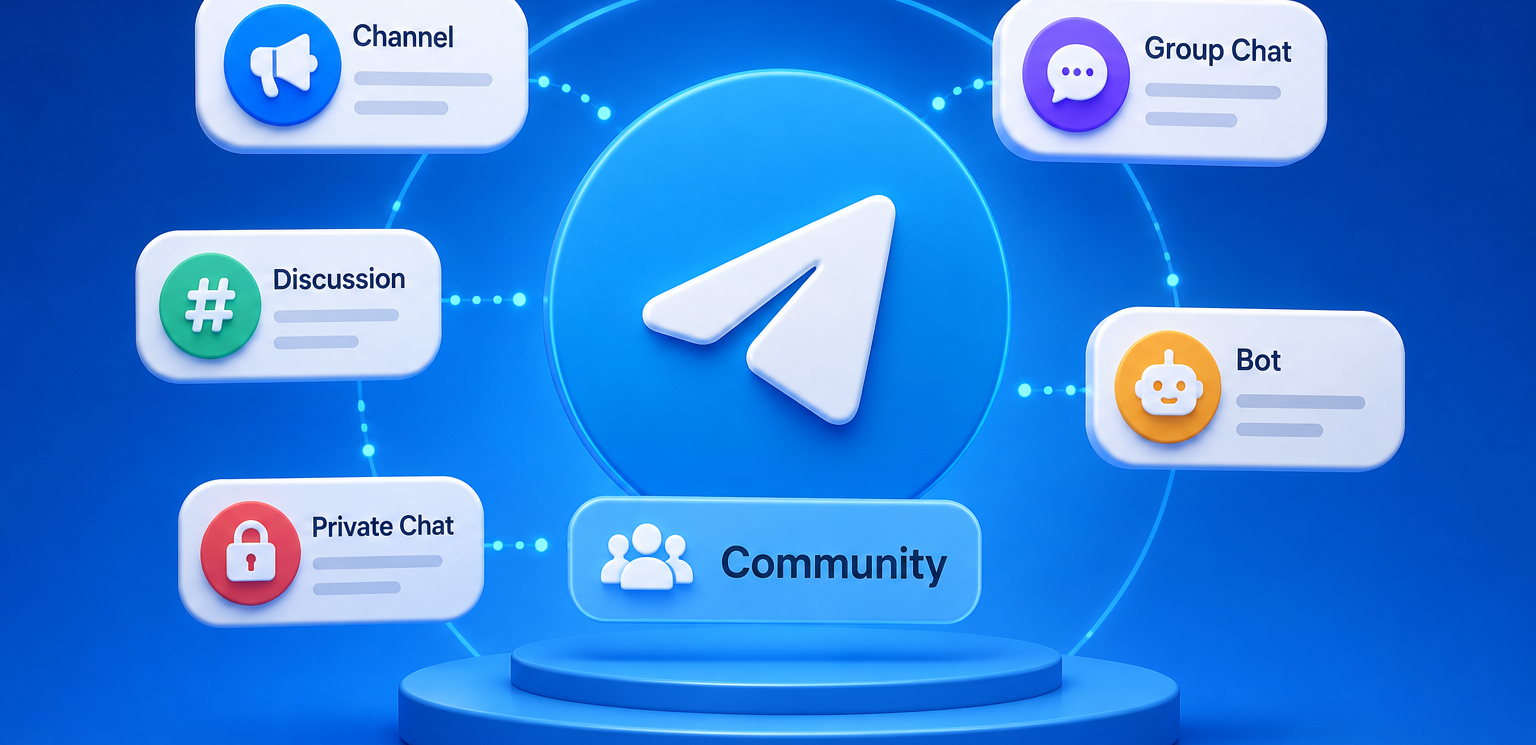
Telegram is testing one of its most significant new features in recent months: Communities. Here’s what they are, how they work, and why you might actually want to use them.
The feature has appeared in Telegram Beta 12.9 for Android and is currently available only on the platform’s test server.
In simple terms, Communities are a way to bring channels, group chats, and bots together into a single themed space. That could be a media outlet, creator community, game, online course, brand, private club, or work project.
Judging by the activity around the feature in the beta app, Communities could become the headline addition to Telegram’s July update, which is likely to arrive before the end of the month.
What are Telegram Communities?
Telegram is currently built around separate entities. There are channels, group chats, bots, and forum topics within groups. They can be connected manually, but in most cases they still exist as separate parts of the app.
A media outlet, for example, might run a main news channel, a discussion group, a separate off-topic chat, a feedback bot, and a private group for subscribers. All of these belong to the same project, but users have to find the right links, join each chat separately, and keep track of them as individual conversations in their chat list.
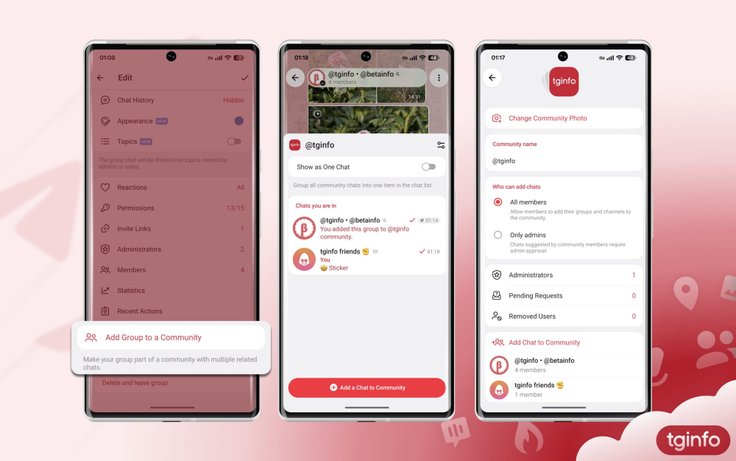
Communities are designed to solve this problem. They act as an umbrella for related channels, group chats, and bots. Each Community can have its own name and profile picture, while the profiles of connected chats, channels, and bots will show which Community they belong to.
In practice, Telegram is testing more than just another way to organize chats into folders. Communities could become a new entry point for entire ecosystems built around a single topic or project.
How Communities work
A user becomes a member of a Community by joining at least one of its connected chats. Telegram does not automatically add them to every other group in the Community. Instead, users can browse the available chats and decide which ones they want to join.
That distinction matters. Communities are not designed to automatically subscribe users to dozens of chats. The idea is closer to navigation across connected spaces. Join one chat, discover the other sections available within the Community, and choose only those that are relevant to you.
Chats within a Community remain independent. Different owners can propose adding their groups to the same Community, while administrators can decide whether to accept or reject those requests.
By default, any member can add their own groups to a Community, although the Community owner can restrict this. With the “Admins Only” setting enabled, regular members can submit groups for consideration, while administrators make the final decision.
How are Communities different from forums?
At first glance, Communities might look like Telegram reinventing its existing forum feature. The underlying model, however, is different.
A Telegram forum is a single group divided into topics. Every topic exists within the same group and shares its broader structure.
Communities work differently. Each section remains a separate chat with its own members, settings, and access rules. A user can join one part of a Community without joining the others.
Administrators will also be able to enable an option that visually groups Community chats into a single item in the chat list. In that mode, the experience may resemble a unified forum, but each section will technically remain an independent chat.
This gives Communities more flexibility. A single Community could include a general chat for everyone, a separate Q&A group, a hidden group for moderators, a private section for subscribers, and a channel for published content.
Public and hidden chats
Telegram is testing two types of chats within Communities: public and hidden.
- A public chat can be joined by any user who is already a member of the Community.
- A hidden chat is visible only to users who have been specifically invited to it. Other Community members cannot access it or even see it in the general list.
This creates several obvious use cases. A single Community could have public discussions for all readers, a private chat for paying subscribers, a separate space for the team, and an internal group for moderators.
Why channel integration matters
Communities initially appeared to be a feature for grouping chats together. Telegram later added the ability to connect channels, significantly expanding what the feature could become.
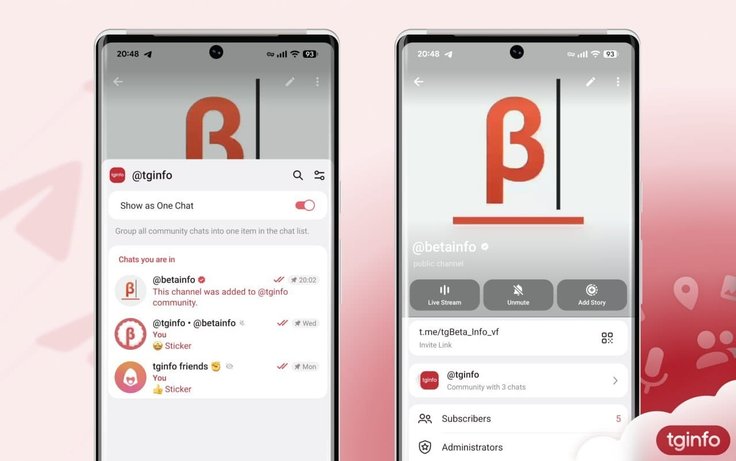
A channel can serve as the main storefront for a Community, hosting news, posts, announcements, or a creator’s content. The chats around it can then handle discussions and more specialized topics.
A media outlet, for example, could have a main news channel, a general reader chat, a smartphone group, an apps discussion group, a private space for longtime readers, and a feedback bot. Today, these exist as a collection of separate links. Communities could bring them together under a single structure.
Channels can be connected from their settings page using the “Add Channel to a Community” option.
For now, both this option and Communities themselves are available only on Telegram’s test server.
Where bots fit in
Another important part of the feature is bot support. One of the latest Telegram beta builds allows Communities to include chatbots alongside chats and channels.
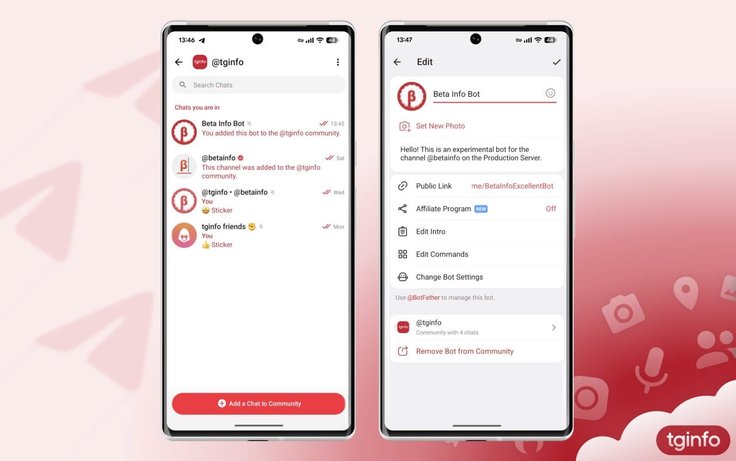
This makes Communities look less like simple collections of discussion spaces and more like complete ecosystems built around a project. Bots could handle moderation, navigation, applications, polls, customer support, access management, notifications, FAQs, or integrations with external services.
That could be particularly useful for large channels, educational projects, brands, and online services. A Community could bring content, discussion, and automation together in one place.
Why everyone is talking about Discord
The closest comparison to Telegram Communities is Discord’s server model. Discord has long organized communities around servers containing multiple channels, roles, rules, access levels, and moderation tools.
Discord describes servers as spaces for gaming, study groups, and other communities, where administrators can create and manage multiple channels. Its roles and permissions system also allows administrators to control what different members can do and which parts of a server they can access.
Discord has also developed onboarding tools for new members. Community Onboarding lets newcomers choose roles and channels by answering a series of questions, giving them a personalized selection of server sections.
There is also Rules Screening, which requires new members to accept a server’s rules before they can send messages, react to posts, or contact other members.
Discord has therefore spent years addressing a problem that is now becoming increasingly relevant to Telegram: how to turn a large, chaotic chat ecosystem into an organized space with clear sections, rules, and different levels of access.
But Telegram is taking a different approach
Despite the similarities, Telegram Communities do not appear to be a direct copy of Discord servers. Discord is built around servers from the ground up. Users join a server first and then navigate the channels inside it.
Telegram has historically worked the other way around, with individual chats, groups, and channels at the center of the experience. Communities therefore look more like a layer built on top of these existing structures. Channels remain channels, chats remain chats, and bots remain bots, but they can now be brought together under one roof.
That could work in Telegram’s favor. Creators and administrators would not have to rebuild their existing projects from scratch. If a channel already has a discussion group, a bot, and several related chats, they could potentially be connected into a Community and presented to users through a clearer navigation system.
Who could benefit from Communities?
Communities could be useful for almost anyone running more than a single chat and managing a broader ecosystem around a project.
Media outlets could bring together news channels, topic-specific discussions, editorial chats, private clubs, and feedback bots. Creators could combine a main channel with a general discussion group, subscriber-only spaces, and separate interest-based chats. Educational projects could organize different cohorts, courses, homework discussions, and support channels. Gaming communities could separate news, team finding, guides, off-topic discussion, and moderator spaces.
Brands could use a similar structure, with one channel for announcements, a separate support chat, a bot for applications or requests, and private groups for loyalty program members or beta testers.
What we still don’t know
Because Communities are currently limited to Telegram’s test server, the final implementation may still change.
It is not yet clear when Communities will reach the stable version of the app, how many chats, channels, and bots can be added, whether Communities will be publicly indexed, whether Telegram plans to introduce a dedicated directory, or how the platform will deal with spam within these larger structures.
The depth of the permissions system is also unclear. Roles and granular permissions are central to Discord, allowing administrators to fine-tune access to individual channels. So far, Telegram is testing at least public and hidden chats, along with controls over who can add groups to a Community. Whether this system will become more sophisticated remains an open question.
Why Communities could be a major update
Telegram stopped being just a messaging app a long time ago. For many users, it is also a news feed, blogging platform, work tool, customer support service, interest-based club, and forum replacement.
But as projects expand across more channels, chats, and bots, navigating them becomes increasingly difficult. Communities could address that problem by organizing Telegram’s disconnected elements into a clearer structure.
If the feature reaches the stable app in something close to its current form, Communities could be one of Telegram’s biggest moves yet toward full-scale community spaces. Not as a replacement for channels and chats, but as a layer on top of them, with shared navigation, public and hidden sections, bot integration, and an organizational model already familiar to Discord users.









Editor’s pick