17:14
Capcom breach exposes 11.7 million account records worldwide

16:56
Anthropic introduces Claude Duet, an AI assistant that checks in first

16:32
Hugging Face’s new AI lets scientists chat with DNA

19:26
Government websites across Europe go offline over critical PHP flaws

17:37
Agile Robots unveils Nvidia-powered humanoid built to learn new skills

13:30
PHP warns website owners to prepare for emergency security updates
17:14
Capcom breach exposes 11.7 million account records worldwide
16:56
Anthropic introduces Claude Duet, an AI assistant that checks in first
16:32
Hugging Face’s new AI lets scientists chat with DNA
19:26
Government websites across Europe go offline over critical PHP flaws
17:37
Agile Robots unveils Nvidia-powered humanoid built to learn new skills
13:30
PHP warns website owners to prepare for emergency security updates
17:14
Capcom breach exposes 11.7 million account records worldwide
16:56
Anthropic introduces Claude Duet, an AI assistant that checks in first
16:32
Hugging Face’s new AI lets scientists chat with DNA
19:26
Government websites across Europe go offline over critical PHP flaws
17:37
Agile Robots unveils Nvidia-powered humanoid built to learn new skills
13:30
PHP warns website owners to prepare for emergency security updates
17:14
Capcom breach exposes 11.7 million account records worldwide
16:56
Anthropic introduces Claude Duet, an AI assistant that checks in first
16:32
Hugging Face’s new AI lets scientists chat with DNA
19:26
Government websites across Europe go offline over critical PHP flaws
17:37
Agile Robots unveils Nvidia-powered humanoid built to learn new skills
13:30
PHP warns website owners to prepare for emergency security updates


Telegram remains one of the most popular and feature-rich messaging platforms, offering users a wide range of tools for private communication. One of these features is Secret Chats, which allow you to exchange messages that can only be seen by you and your conversation partner.
In this guide, we explain how Secret Chats work, why you might need them, how to create and delete them, and what to keep in mind when using them.
What Is a Secret Chat?
A Secret Chat in Telegram is a conversation protected by end-to-end encryption, where messages are transmitted directly between the devices of the participants. This means the messages are not stored on Telegram’s servers and are inaccessible even to the company itself.
Key features of Secret Chats:
- End-to-end encryption: Messages are encrypted on the sender’s device and decrypted only on the recipient’s device.
- Device-specific: The chat is available only on the device where it was created. If you log out or change devices, the chat disappears.
- No forwarding: Messages cannot be forwarded to other chats.
- Screenshot alerts: If someone takes a screenshot, both participants receive a notification.
- Self-destruct timer: You can set messages to automatically disappear after a chosen time interval (from 1 second to 1 week).
Important: Secret Chats differ from regular chats, which use server-side encryption and sync across all your devices. Secret Chats provide maximum privacy but come with certain limitations.
Why Use Secret Chats?
Secret Chats are designed for situations where confidentiality is a priority. Here are a few examples:
- Business: Discussing contracts, financial data, or other sensitive documents.
- Journalism: Protecting sources and securely exchanging information.
- Personal conversations: Discussing private or family matters that should not be shared with third parties.
- Data protection: If a device is lost or compromised, Secret Chats reduce the risk of data leaks.
Benefits of Secret Chats
- Maximum privacy through end-to-end encryption.
- Screenshot notifications.
- Message self-destruction for added security.
Who is it for?
Secret Chats are popular among business professionals, freelancers, journalists, developers, and anyone working with sensitive information. For example, real estate agents may use them to share client data, while designers can protect their ideas from unauthorized use.
How to Create a Secret Chat
You can create a Secret Chat only on mobile devices (Android or iOS). This feature is not available on desktop or in the web version.
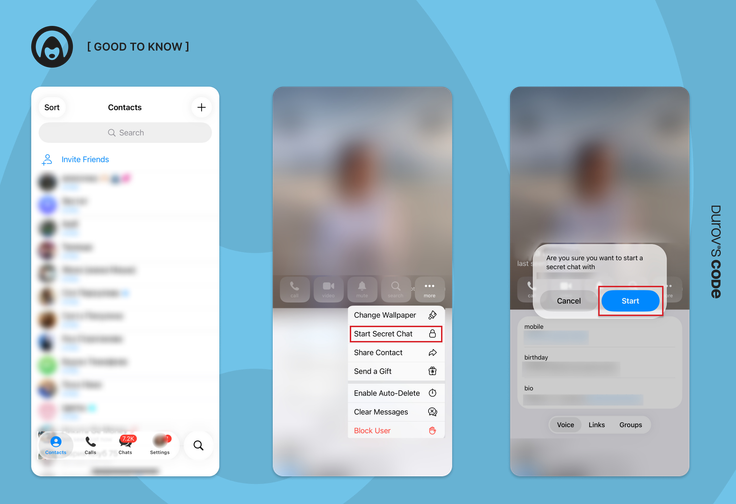
- Open Telegram on your smartphone or tablet.
- Select a contact using search or your contacts list.
- Open the contact’s profile by tapping their name or avatar.
- Tap the three dots in the top-right corner.
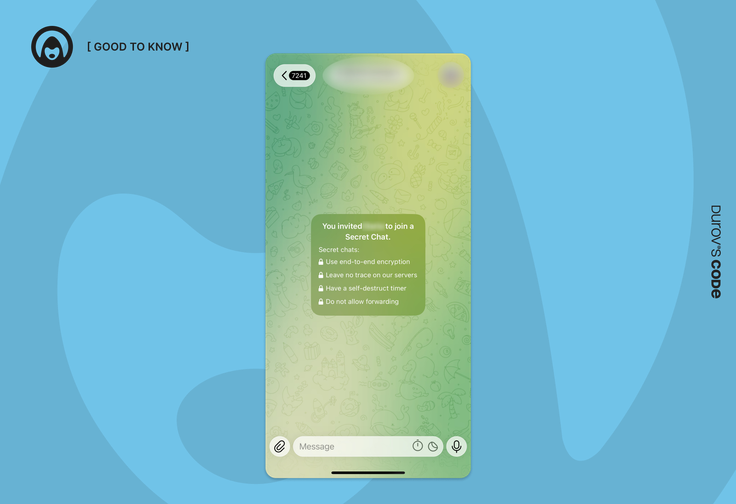
- Select “Start Secret Chat.” A short description of the feature will appear.
- Confirm by tapping “Start.”
Important: The other person must be online to start the chat. If they are offline, you will see a message saying: “Waiting for [name] to come online.”
A Secret Chat will appear in your chat list marked with a lock icon and green text.
Verifying Encryption
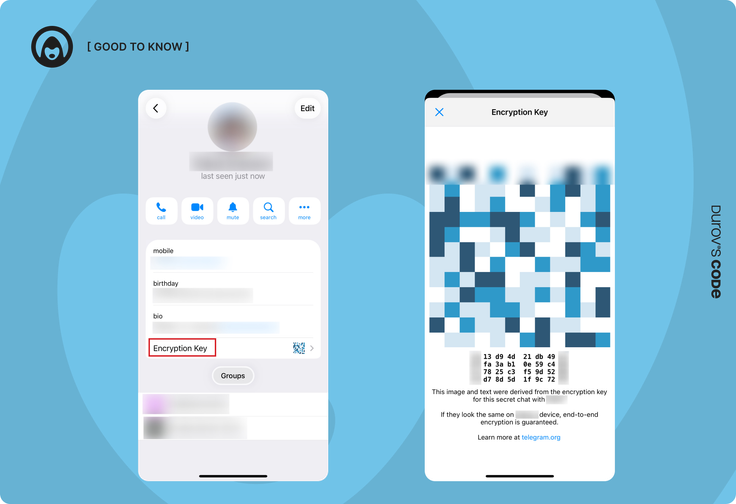
After creating a Secret Chat, tap the contact’s name and select “Encryption Key.” You will see an image or code that must match on both devices. For maximum security, verify this key with your contact in person or via another secure channel.
How to Set a Self-Destruct Timer
You can enable automatic message deletion for extra protection.
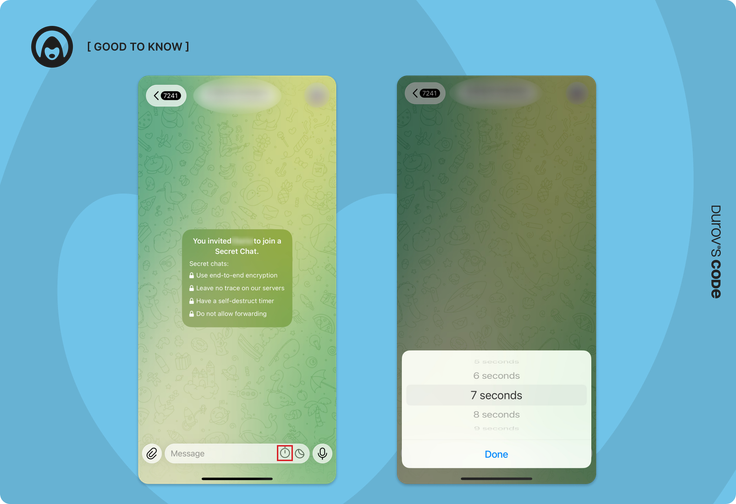
- Open the Secret Chat.
- Tap the clock icon (on Android it appears at the top; on iOS it is near the message input field).
- Select a time interval from 1 second to 1 week.
- Confirm. All new messages will be deleted after the selected time once they are read.
Tip: Messages sent before the timer was enabled will not be deleted automatically and must be removed manually.
How to Delete a Secret Chat
If you no longer need a Secret Chat:
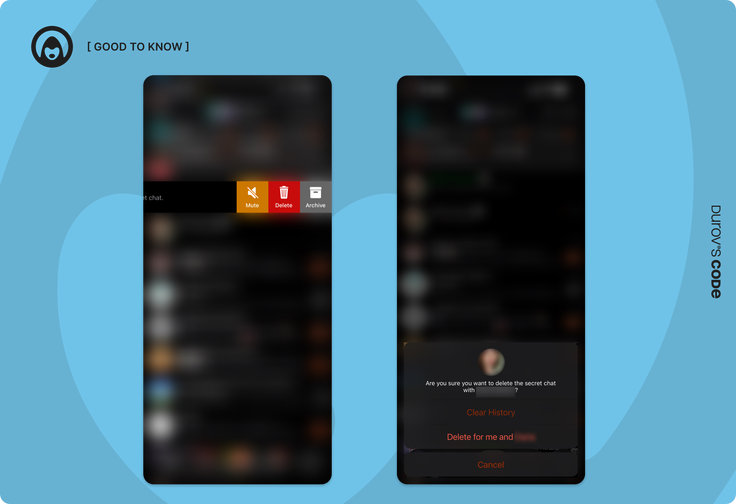
- Open your chat list.
- Find the Secret Chat (marked with a lock icon).
- Swipe left.
- Tap “Delete.” You can delete the chat only for yourself or for both participants.
Important: Deleting the chat for both participants permanently removes the conversation with no recovery option. If you delete it only for yourself, the other person will still retain the chat.
Alternative method
Log out of your Telegram account. All Secret Chats will be deleted automatically.
- Go to Settings.
- Tap the three dots or Edit in the top-right corner.
- Select Log Out.
Features and Nuances
Secret Chats offer several advanced privacy features:
- Screenshot notifications: You will be alerted if the other person takes a screenshot. However, they can still photograph the screen with another device, so only trust reliable contacts.
- Self-destructing messages: Messages disappear automatically after being read.
- Forwarding disabled: Messages cannot be forwarded, reducing leak risks.
- Blurred images: When a timer is set to under one minute, images appear blurred and are visible only while holding your finger on the screen.
Example: If you send a document with a 10-second timer, it will disappear 10 seconds after the recipient opens it.
Limitations of Secret Chats
Despite their strong security, Secret Chats have important limitations:
- No synchronization: The chat exists only on the device where it was created.
- Deleted on logout: Logging out removes all Secret Chats.
- Limited features: Reactions, pinned messages, and chat folders are not supported.
- One-to-one only: Group Secret Chats are not available.
- No cloud storage: Deleted chats cannot be restored.
Troubleshooting
Common issues include:
- Chat won’t start: Make sure the contact is online and try again later.
- Messages aren’t deleting: Check whether the self-destruct timer is enabled and delete older messages manually.
- No screenshot notification: You may have started a regular chat instead of a Secret Chat. Secret Chats must display a lock icon.
Tip: If issues persist, update Telegram to the latest version or contact support through the app.
Conclusion
Telegram Secret Chats are a powerful tool for anyone who values privacy. They offer maximum protection through end-to-end encryption, self-destructing messages, and screenshot notifications. At the same time, functionality is limited: chats do not sync across devices, group chats are unavailable, and all data is erased when you log out.
Useful tips:
- Verify encryption keys to ensure secure communication.
- Use self-destruct timers for sensitive conversations.
- Trust your contact. Screens can still be photographed externally.
- Keep the app updated for security improvements.
- Secret Chats are not a silver bullet, but when used correctly, they significantly enhance the privacy of your communications.










Editor’s pick