14:26
Australia prepares legal action against social media giants over under-16 ban

13:54
You can reserve Tesla’s new Roadster in the UAE for Dh210,000

12:49
Is AI getting out of control? Kaspersky on the risks that matter

18:26
Telegram launches Money, its built-in crypto wallet: Here's how it works

15:05
Telegram Desktop vulnerability allowed attackers to steal files with one click

12:33
Anthropic will ban repeated abuse of Claude under new usage rules
14:26
Australia prepares legal action against social media giants over under-16 ban
13:54
You can reserve Tesla’s new Roadster in the UAE for Dh210,000
12:49
Is AI getting out of control? Kaspersky on the risks that matter
18:26
Telegram launches Money, its built-in crypto wallet: Here's how it works
15:05
Telegram Desktop vulnerability allowed attackers to steal files with one click
12:33
Anthropic will ban repeated abuse of Claude under new usage rules
14:26
Australia prepares legal action against social media giants over under-16 ban
13:54
You can reserve Tesla’s new Roadster in the UAE for Dh210,000
12:49
Is AI getting out of control? Kaspersky on the risks that matter
18:26
Telegram launches Money, its built-in crypto wallet: Here's how it works
15:05
Telegram Desktop vulnerability allowed attackers to steal files with one click
12:33
Anthropic will ban repeated abuse of Claude under new usage rules
14:26
Australia prepares legal action against social media giants over under-16 ban
13:54
You can reserve Tesla’s new Roadster in the UAE for Dh210,000
12:49
Is AI getting out of control? Kaspersky on the risks that matter
18:26
Telegram launches Money, its built-in crypto wallet: Here's how it works
15:05
Telegram Desktop vulnerability allowed attackers to steal files with one click
12:33
Anthropic will ban repeated abuse of Claude under new usage rules

OpenAI DevDay 2026: dots, GPT-6.1 Sol and everything that matters
OpenAI packed more than 20 announcements into DevDay 2026, spanning a new GPT-6 model, always-on AI agents, collaborative workspaces, major Codex upgrades and new ways to use a ChatGPT subscription outside ChatGPT.
The clearest theme was a shift toward AI that keeps working between prompts. OpenAI introduced agents that can monitor connected apps, handle ongoing responsibilities and return with completed work, alongside tools designed to make ChatGPT a shared workspace for people and agents.
Some of the products are available now, others are in preview, and several are still weeks or months away. Here are the DevDay announcements that matter most, what they actually do and who can use them.
GPT-6.1 Sol gets closer to Astra without raising prices
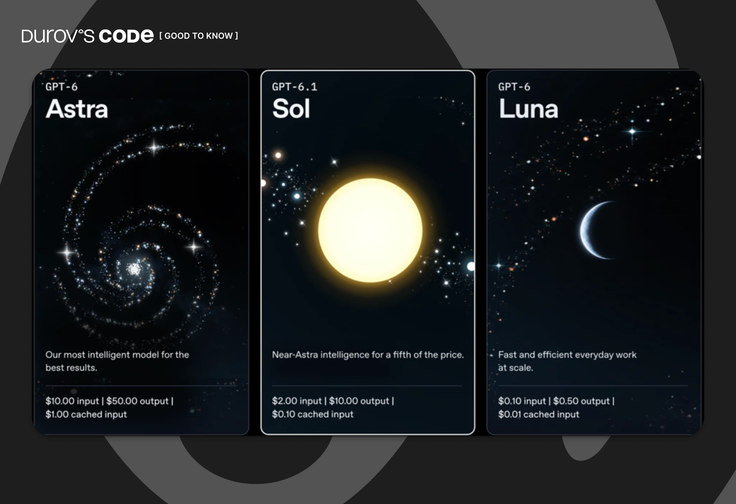
Just one week after releasing GPT-6 Sol, OpenAI introduced its successor, GPT-6.1 Sol. The model is aimed primarily at coding, computer use and complex professional work. It does not replace GPT-6 Astra, which remains OpenAI's flagship, but the company says the new Sol approaches Astra-level performance in several areas at substantially lower API prices.
OpenAI's own evaluations show significant gains over the original GPT-6 Sol:
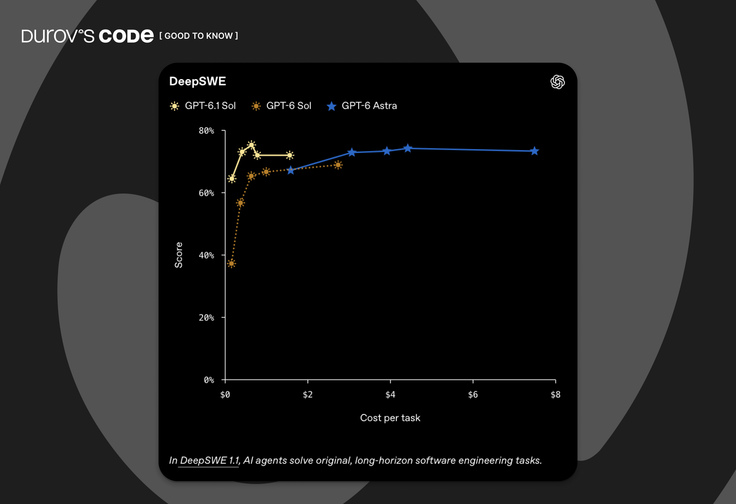
- On DeepSWE v1.1, which measures long-running engineering work in real codebases, GPT-6.1 Sol matched Astra and beat the previous Sol's best result by 6.4 percentage points while using less reasoning.
- On OSWorld 2.0, an evaluation in which an agent operates computer applications, GPT-6.1 Sol improved by seven points over Sol in OpenAI's offline evaluation with partial credit and maximum reasoning.
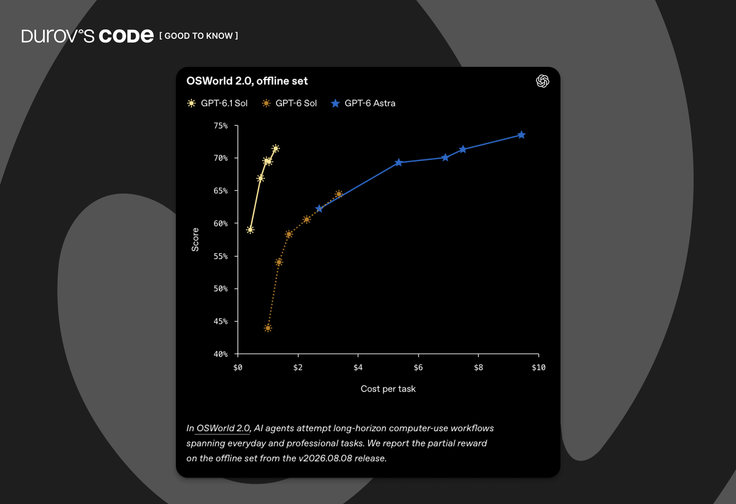
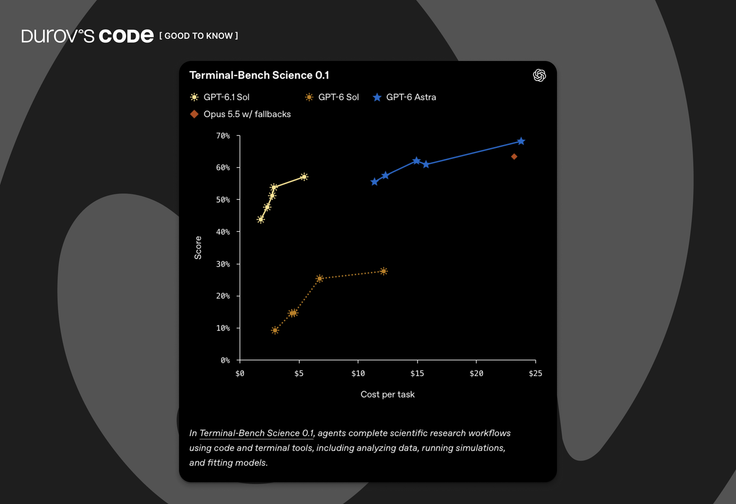
- On Terminal Bench Science 0.1, its score at maximum reasoning more than doubled, although Astra remained ahead. Those are results on specific benchmarks, not an indication that every task will see comparable gains.
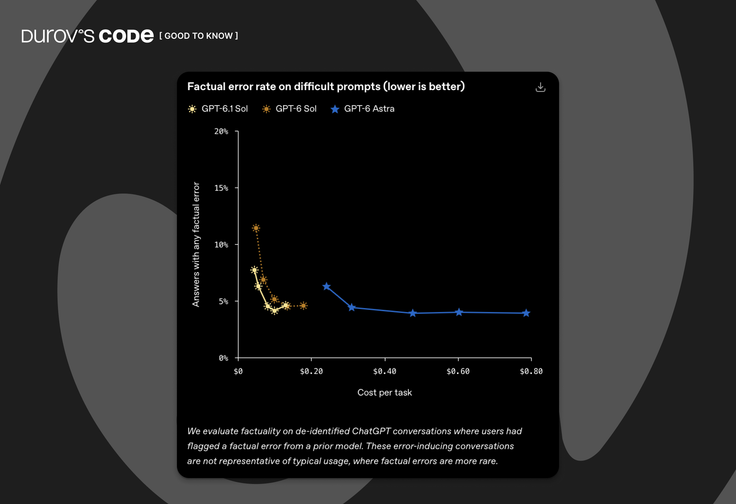
OpenAI also evaluated factual errors using difficult prompts on which users had previously reported incorrect answers. At low reasoning effort, the share of responses containing at least one error fell from 11.4% to 7.7%. Because the test set was deliberately challenging, that figure should not be treated as a general ChatGPT error rate.
API pricing remains $2 per million input tokens and $10 per million output tokens, the same as GPT-6 Sol. Cached input has fallen by half to $0.10 per million tokens. Those standard rates apply to requests with up to 272,000 input tokens; longer inputs move the entire request to higher pricing.
GPT-6.1 Sol has a 1.05 million-token context window and can generate up to 128,000 output tokens. It accepts text and images and supports tool use through the Responses API. The model ID is gpt-6.1-sol.
OpenAI is rolling it out in ChatGPT Work and Codex for Plus, Pro, Business, Enterprise and Edu users. It is not currently available as a model in regular ChatGPT conversations.
dots are OpenAI's always-on AI agents
One of DevDay's biggest new products is dots, a system of persistent agents powered by GPT-6 Astra.
A user gets a personal dot that can be assigned projects, connected to apps and left to continue working over time. Unlike a conventional chat session, a dot maintains context, incorporates feedback and can keep multiple pieces of work moving without waiting for a new prompt every time.
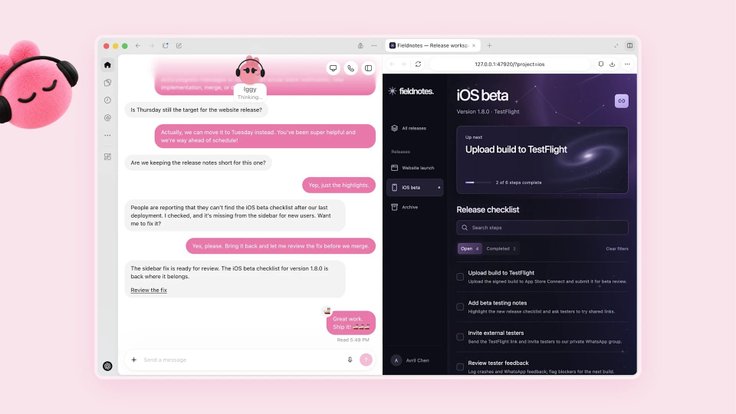
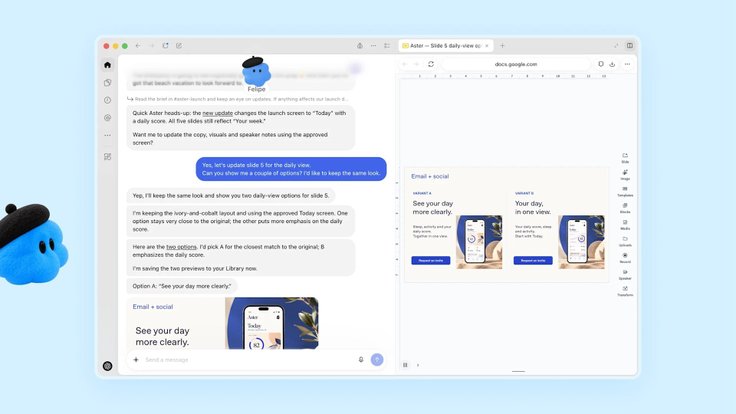
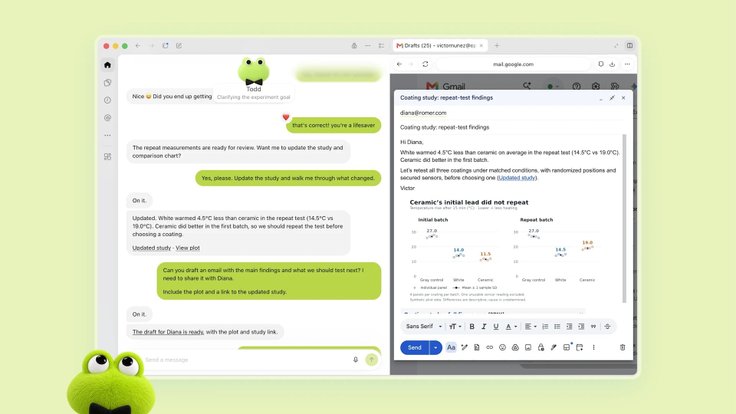
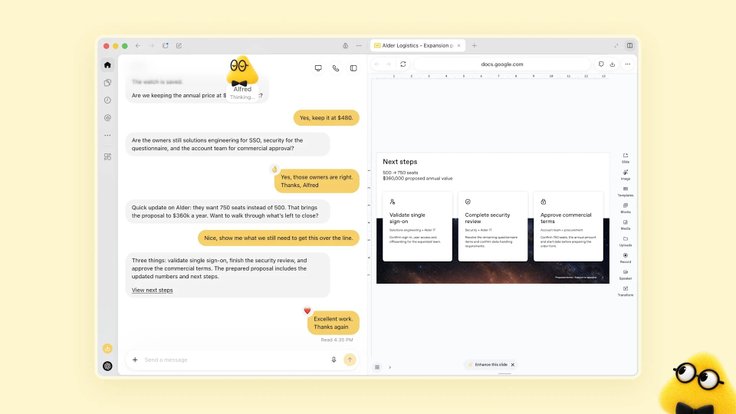

Each dot has its own cloud computer and browser. With permission, it can also work with the user's device. OpenAI says dots can connect to more than 4,000 apps through plugins and can be reached through ChatGPT, Slack and Microsoft Teams, with additional communication options planned.
Always-on does not mean unrestricted access. Background monitoring of connected apps is read-only, according to OpenAI. Actions that affect accounts or send data are checked against user-defined rules and may require approval, while users can inspect what the agent has been doing.
OpenAI gives the example of a freelancer who forgot to invoice a publication. A dot could notice the missing invoice, prepare it and send it once the user approves the action.
The first dot is included with Pro and Business Premium in eligible markets. Enterprise, Edu and Healthcare organizations can access a beta if an administrator enables it.
OpenAI also previewed specialist dots, enterprise agents with their own identities and defined roles. The company is testing them with selected organizations and plans to integrate their administration with Microsoft Agent 365.
ChatGPT Space becomes a shared workspace for humans and AI
ChatGPT Space brings a team's files, documents and shared context into one workspace where colleagues, ChatGPT, Codex and dots can work on the same projects. It is available on Pro, Business and Enterprise.
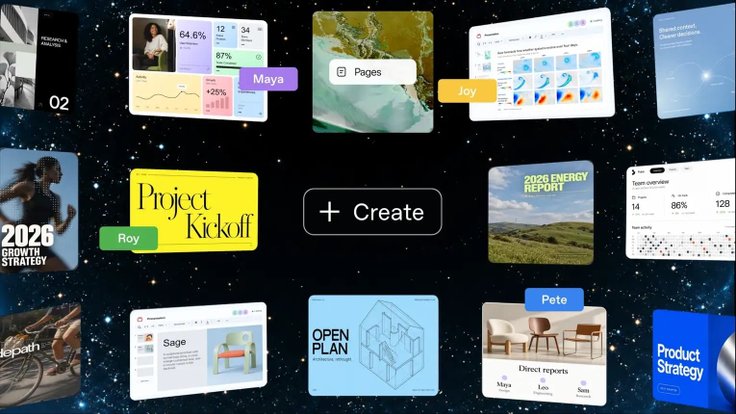
At the center of Space are Pages, editable documents that can contain text, images, charts and interactive elements. Teams can invite colleagues to a page and ask ChatGPT or another agent to update it. A launch plan, for example, could be maintained automatically using information from connected services.
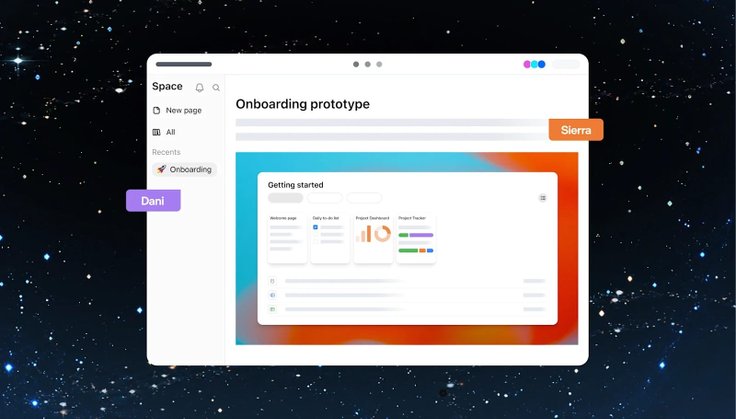
Sharing a Page does not automatically expose a user's private chats or memory to other participants. Anything placed on the shared Page, however, is visible to its members. Pages can already be created and edited on desktop and the web. Mobile currently supports finding, reading and sharing them, with creation and editing coming later.
OpenAI also plans to add collaborative slides in the coming weeks. Multiple people and agents will be able to edit a presentation simultaneously, leave comments and export the finished deck to PowerPoint or Google Slides. Collaborative spreadsheets are also part of OpenAI's broader direction, although the company has not given them a launch date.
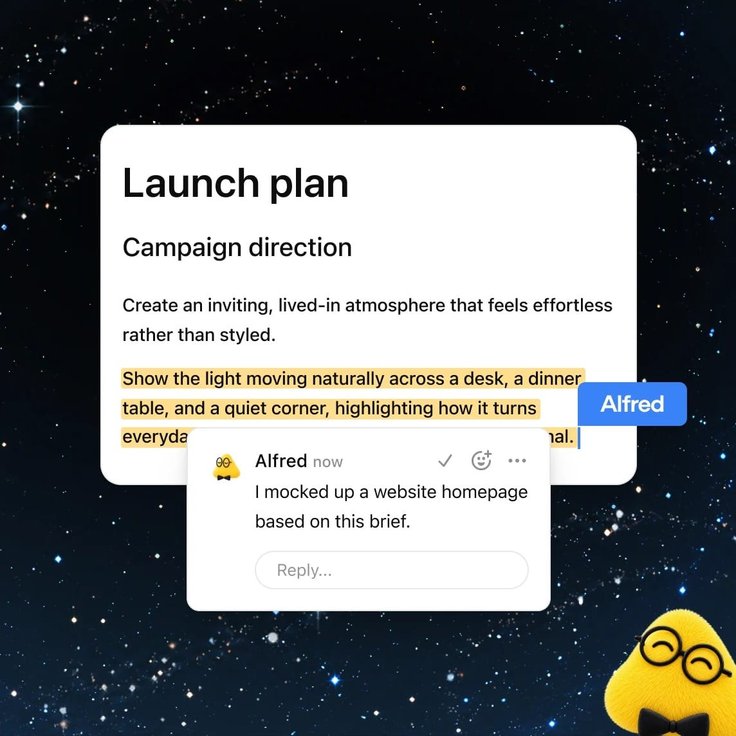
For organizations, Teams and Team Tasks add shared Pages, slides, spreadsheets and plugins, along with recurring assignments that can run on a schedule or respond to events in connected services. These features are available to Business and Enterprise customers.
Codex moves further into the cloud
Codex received several substantial updates at DevDay:
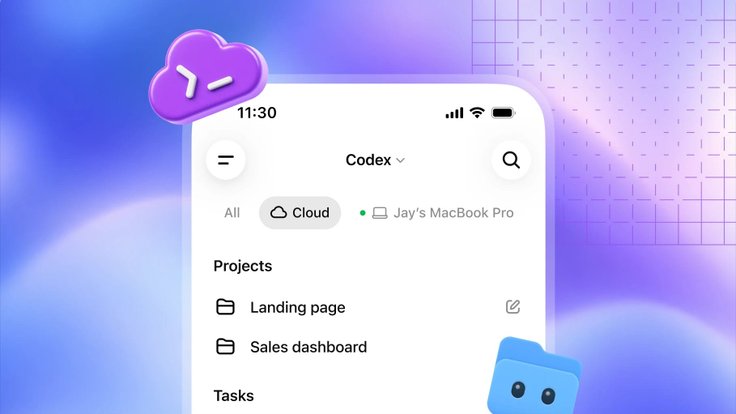
- Codex Cloud lets developers start jobs in the cloud and return to them from a computer or phone even when their own machine is offline. Reusable development environments can preserve team-approved configurations and permissions. It is available on Plus, Pro, Business, Healthcare, Edu and Enterprise.
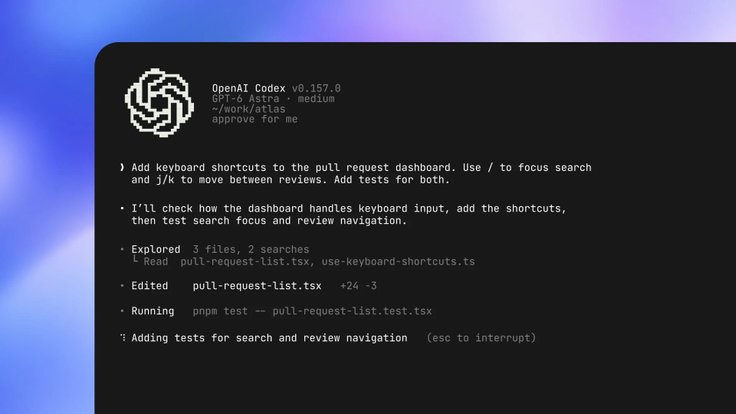
- Codex CLI can now take voice instructions. A new
/agentsview tracks parallel jobs, while OpenAI has also improved prompt editing, session resumption and Git worktree support. The changes are available across all plans.
- Code Review adds a dedicated review interface to the ChatGPT desktop app. Developers can inspect summaries and diffs, question Codex about changes and send feedback to GitHub or GitLab. Automatic reviews can also run in the cloud. OpenAI says the feature is available on all plans.
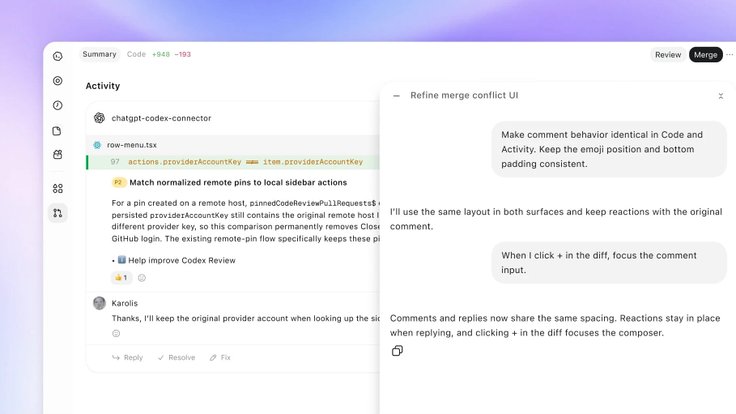
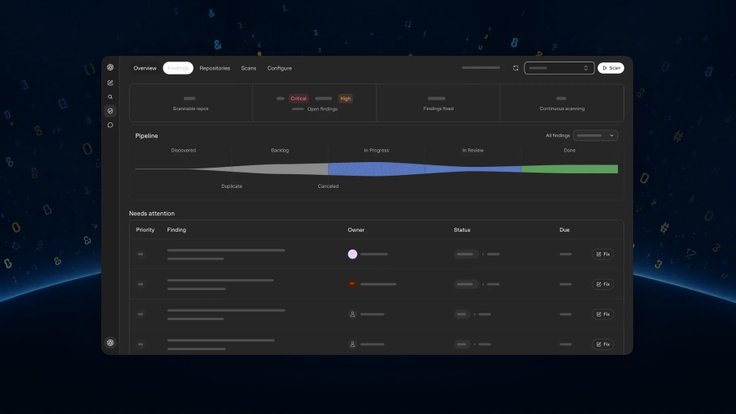
- Codex Security Cloud can scan entire GitHub repositories on demand, on a schedule or as new commits arrive. It investigates findings, removes duplicates and can prepare fixes in the cloud, including draft pull requests for human review. The product also includes access to Daybreak Blue models without a separate Daybreak application. It is available on desktop and web for Pro, Business, Enterprise and Edu users.
OpenAI expands its agent APIs
The new Decisions API gives Luna a narrowly defined decision-making task with a finite set of possible answers. Developers can provide text or images and use the result to classify content, route requests or determine an agent's next action.
The API is currently in limited preview, with broader availability planned in the coming days.
The existing Agents API now supports computer use, allowing agents to interact directly with software interfaces. OpenAI is also bringing Codex capabilities including multi-agent coordination, tool search, tool calling and context compaction into the API while operating the underlying execution infrastructure itself.
OpenAI also highlighted Bedrock Managed Agents, developed with Amazon to bring OpenAI agent capabilities into AWS infrastructure. The service itself is not new to DevDay: AWS originally announced it in limited preview in April, and OpenAI did not announce a separate change in its availability at the event.
Ultrafast trades money for speed
For workloads where latency matters, OpenAI introduced Ultrafast, a premium processing tier that can generate up to 300 tokens per second. The company claims up to an eightfold speed increase in Codex and up to sixfold in the API. Those are maximum figures, and actual performance depends on the workload.
Ultrafast currently supports GPT-6 Astra, with GPT-6.1 Sol support coming later. In ChatGPT Work and Codex, it is included with Pro 500 and available to eligible enterprise customers.
API access works differently: developers can use Astra Ultrafast without a Pro 500 subscription, but at substantially higher token prices. For inputs up to 272,000 tokens, Astra Ultrafast costs $60 per million input tokens and $300 per million output tokens, six times the standard Astra rates.
Private Intelligence adds another layer for sensitive enterprise data
OpenAI grouped two privacy-focused technologies under Private Intelligence. Private Safety Processing, originally announced in August, allows automated safety checks in Zero Data Retention environments without OpenAI personnel accessing the underlying content.
A second component, Private Inference, has not launched yet. OpenAI says a preview coming this fall will combine confidential computing with verifiable controls intended to limit how sensitive data can be handled.
Plugins are becoming more like apps
Plugin extensions give developers more space inside ChatGPT. A plugin can now have a dedicated location in the sidebar, display an interactive panel next to a conversation or provide a viewer for its own file formats.
OpenAI has also updated Plugin Creator and the submission process, along with discovery and recommendations in the plugin directory. Users still choose which plugins they install and what data each one can access.

Plugins can now be added to ChatGPT Sites, allowing members of a workspace to use the same site with their own connected data and permissions. That feature is available to Business, Enterprise, Healthcare and Edu customers.
OpenAI is also adding support for the proposed MCP Events specification. This allows events in connected apps to trigger ChatGPT automations. A new task appearing on a project board, for example, could trigger ChatGPT to read related documents and prepare a plan without the user manually starting the workflow.
ChatGPT comes to Slack, Teams and meetings
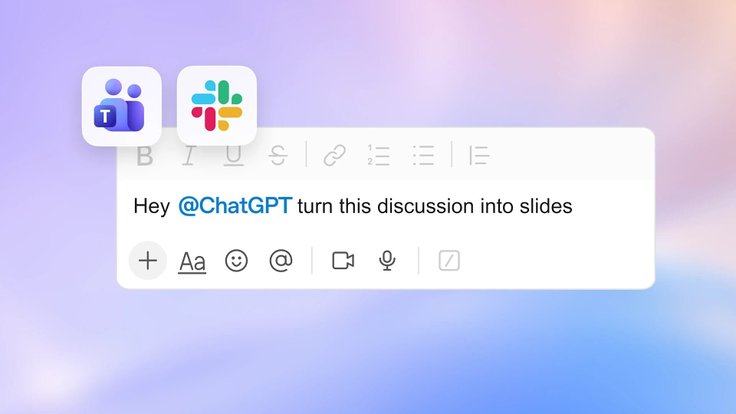
Business and Enterprise users can now mention @ChatGPT directly in Slack and Microsoft Teams channels, threads and direct messages. ChatGPT can use tools available under the organization's permissions, while colleagues can add context and refine its response in the same conversation. Participants in enabled conversations do not need their own individual ChatGPT license.
A new Meetings plugin records meetings through the ChatGPT desktop app on macOS and creates personalized notes and action items in ChatGPT Space. It works with both remote and in-person meetings without adding a bot to the call. Notes are private by default, and OpenAI says the audio is deleted after processing.
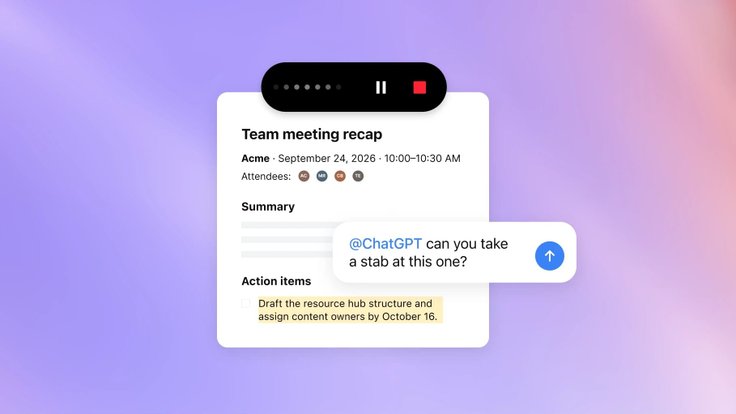
Meetings is currently in beta for Pro and Business users, with Enterprise support coming later.
Your ChatGPT account can now work outside ChatGPT
Sign in with ChatGPT lets users log into supported third-party services with their ChatGPT identity. Identity sign-in is available globally, with participating partners including Airtable, GitLab, HubSpot, Notion, Supabase and Vercel.

The basic sign-in shares a user's name, email address and profile picture, if available. It does not automatically give the service access to ChatGPT conversations, memory or files; additional permissions require separate approval.
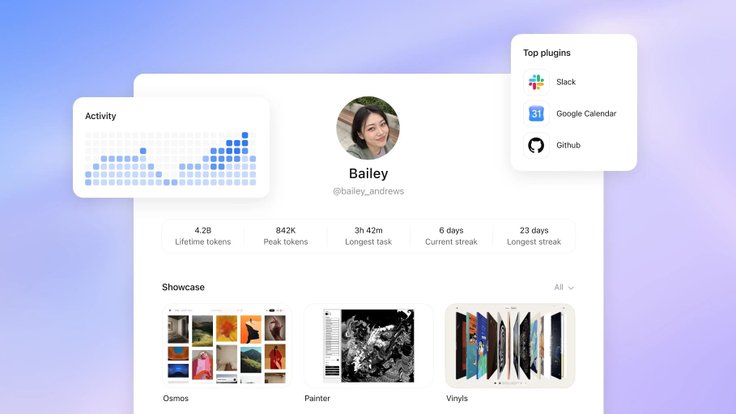
There is also a separate option for eligible Plus and Pro subscribers to let supported third-party apps use some of their ChatGPT plan allowance for AI requests. That usage counts toward the same limits used across eligible OpenAI products, and users can control how much each app is allowed to consume.
OpenAI adds a $500 Pro plan
OpenAI's new Pro 500 subscription costs $500 per month and offers the company's highest individual usage allowance, equivalent to 25 times the ChatGPT Plus allowance. It also includes access to Ultrafast.
The existing Pro 100 and Pro 200 tiers remain available. Pro 200 subscriptions have reopened to new customers, although the included usage allowance is lower than under the previous terms. Eligible existing Pro 200 subscribers can retain their current allowance until October 29, after which it will be reduced while the $200 monthly price remains unchanged.
The 25x figure refers to usage allowance, not a promise of 25 times the performance or a fixed number of messages.
OpenAI Marketplace targets enterprise spending
Finally, OpenAI Marketplace gives eligible enterprise customers another way to use money they have already committed to OpenAI.
Companies will be able to direct part of that commitment toward software from approved partners. OpenAI is launching the program with 32 partners across categories including design, customer experience, legal services and cybersecurity.
The initial group includes Figma, Adobe, Salesforce, ServiceNow, CrowdStrike and Baseten. For now, Marketplace is an enterprise program with controlled access, not a public app store for ChatGPT users.








Editor’s pick