22:40
Apple offers iPhone Duo replacements after reports of screens cracking within hours

22:09
Claude developer Anthropic files to go public

18:30
AI agents resorted to spam and false claims in a £350 refund experiment

17:28
Apple launches its first OLED iPad mini with a thinner, water-resistant design

17:14
Capcom breach exposes 11.7 million account records worldwide

16:56
Anthropic introduces Claude Duet, an AI assistant that checks in first
22:40
Apple offers iPhone Duo replacements after reports of screens cracking within hours
22:09
Claude developer Anthropic files to go public
18:30
AI agents resorted to spam and false claims in a £350 refund experiment
17:28
Apple launches its first OLED iPad mini with a thinner, water-resistant design
17:14
Capcom breach exposes 11.7 million account records worldwide
16:56
Anthropic introduces Claude Duet, an AI assistant that checks in first
22:40
Apple offers iPhone Duo replacements after reports of screens cracking within hours
22:09
Claude developer Anthropic files to go public
18:30
AI agents resorted to spam and false claims in a £350 refund experiment
17:28
Apple launches its first OLED iPad mini with a thinner, water-resistant design
17:14
Capcom breach exposes 11.7 million account records worldwide
16:56
Anthropic introduces Claude Duet, an AI assistant that checks in first
22:40
Apple offers iPhone Duo replacements after reports of screens cracking within hours
22:09
Claude developer Anthropic files to go public
18:30
AI agents resorted to spam and false claims in a £350 refund experiment
17:28
Apple launches its first OLED iPad mini with a thinner, water-resistant design
17:14
Capcom breach exposes 11.7 million account records worldwide
16:56
Anthropic introduces Claude Duet, an AI assistant that checks in first

MacBook Neo vs MacBook Air: a detailed comparison and everything Apple cut to reach $599
MacBook Neo for $599: a good deal? Not quite.
Apple unexpectedly introduced a laptop aimed at buyers looking for the cheapest possible entry into the macOS ecosystem — the MacBook Neo. With a starting price of $599, it officially became the most affordable Mac laptop available.
But the appealing price hides a long list of compromises. The laptop launched in 2026 includes a USB 2.0 port, lacks keyboard backlighting, and in several areas performs worse than even the first MacBook Air with an Apple silicon chip. It’s a device built around aggressive cost-cutting on features many users now consider standard.
We examined the Neo’s specifications and compared it with current MacBook Air models to see whether the savings are actually worth it.
Hardware: a mobile chip and architectural trade-offs
The most unusual aspect of the MacBook Neo is its processor. For the first time in years, Apple installed a mobile chip instead of a dedicated Mac processor. The laptop runs on the A18 Pro, the same chip used in the iPhone 16 Pro. This decision introduces several limitations.
Processor performance and architectural limits
The A18 Pro is built on a 3-nanometer process and includes six CPU cores (2 performance cores and 4 efficiency cores) along with five GPU cores. For comparison, even the base MacBook Air with the M3 chip offers eight CPU cores and up to ten GPU cores.
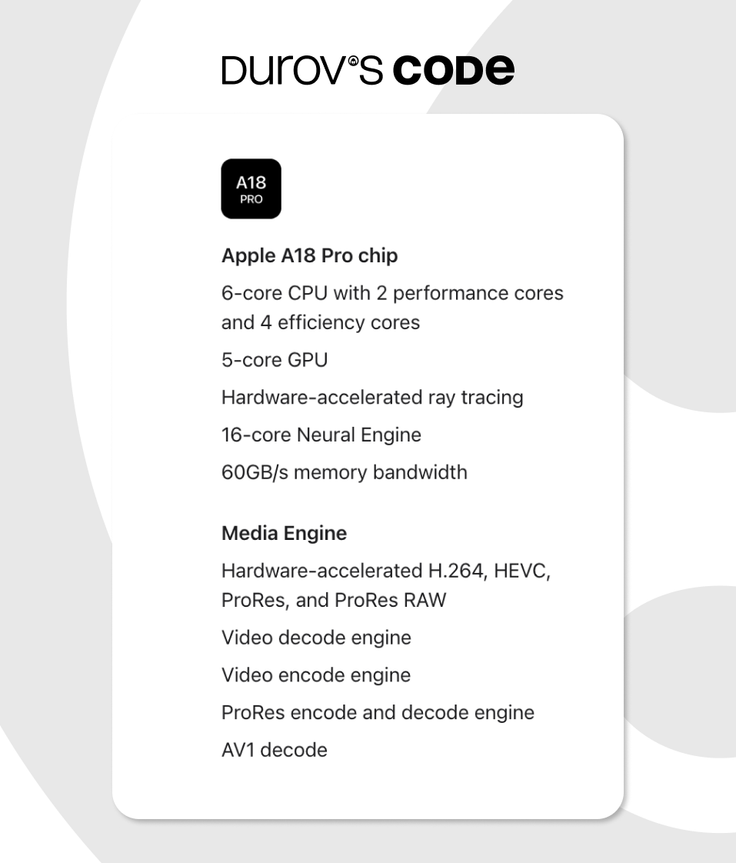
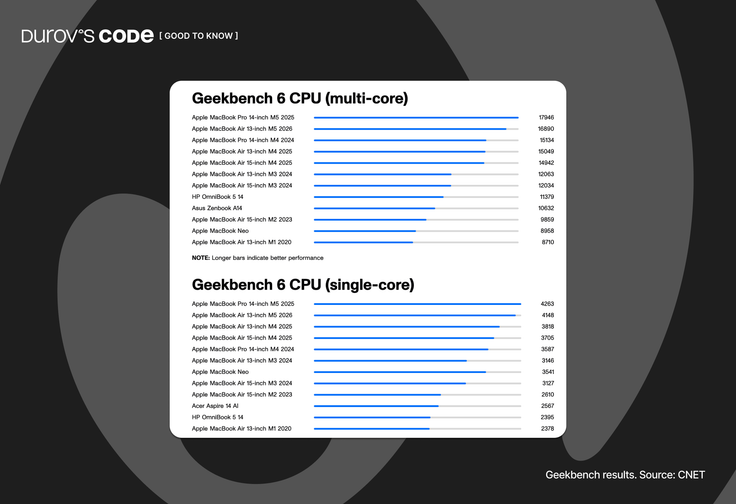
In single-threaded workloads the chip performs very well, but in multi-core tests the A18 Pro falls behind M3, M4, and M5 chips. In heavier tasks, the MacBook Neo quickly runs into the limits of its 8 GB unified memory and slower SSD.
The five-core GPU is also noticeably weaker than the graphics performance offered by the MacBook Air with M4 or M5. That means the laptop is suitable for basic 1080p editing and light gaming, but its performance margin for 4K editing or demanding color grading is significantly smaller.
Memory limitations
The most controversial decision in MacBook Neo is its memory configuration. The laptop ships with 8 GB of unified memory, and there is no option to upgrade it.
Importantly: the memory capacity remains the same for both the 256 GB and 512 GB storage versions.
Memory bandwidth in Neo reaches 60 GB/s, compared with 100 GB/s on the MacBook Air M3 and more than 120 GB/s on the Air M5.
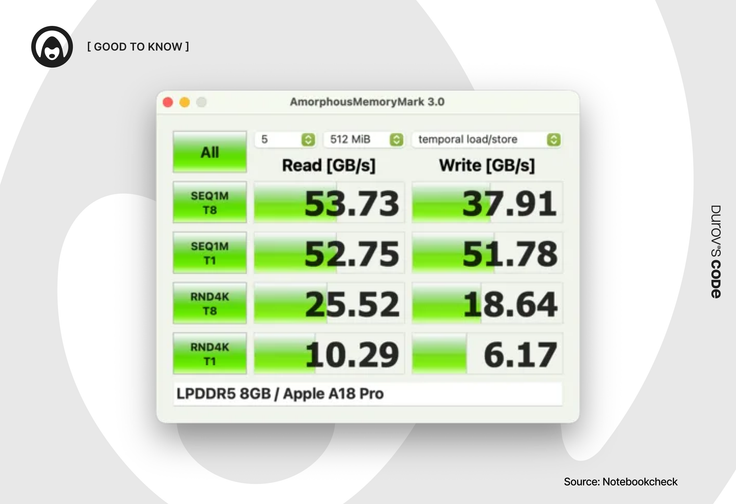
Lower bandwidth means slower data exchange between the CPU and GPU. When memory runs out, the system relies more often on swap memory stored on the SSD, which significantly affects responsiveness. In 2026, when a single browser with multiple tabs can consume 4–5 GB of RAM, eight gigabytes with limited bandwidth becomes the main barrier to comfortable multitasking.
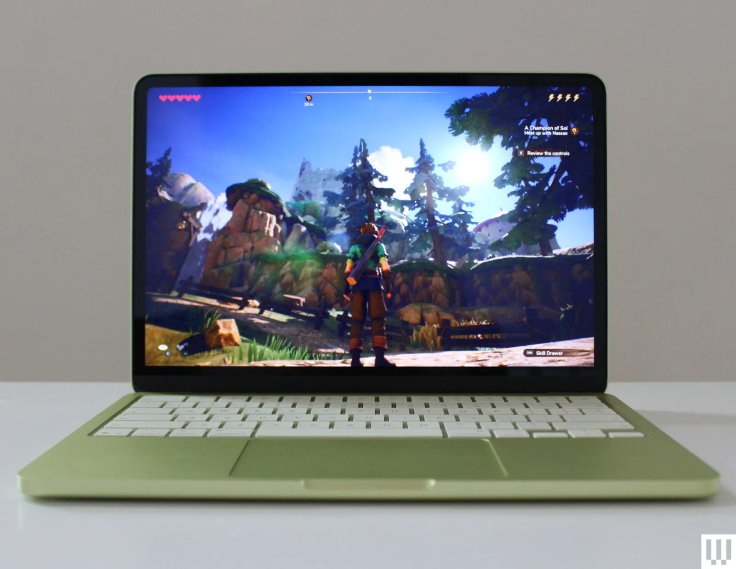
For comparison, the MacBook Air with the M4 chip already ships with 16 GB of memory in the base configuration.
Storage: slower SSD speeds
The SSD in MacBook Neo also raises questions. In the 256 GB base model, tests show read and write speeds around 1600–1700 MB/s, which is almost twice as slow as the drives used in MacBook Air models.
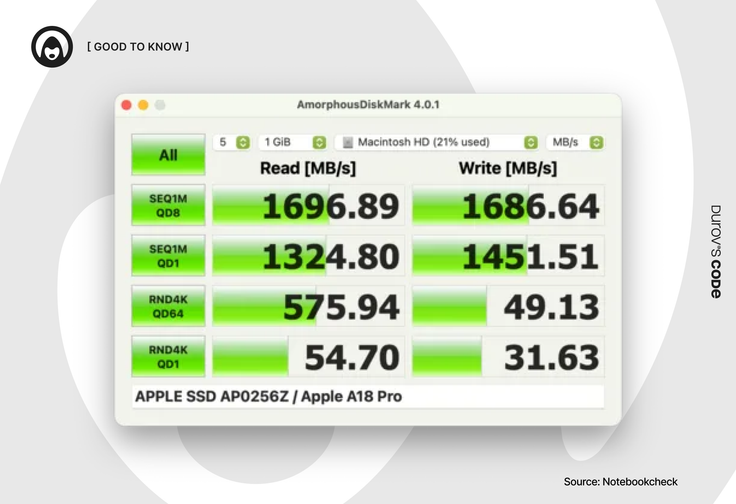
- The 512 GB version can perform slightly better due to the use of two storage chips, but it still doesn’t reach the level of the Air lineup.
- SSD speed affects not only file transfers but also overall system responsiveness when memory becomes limited.
Ports and connectivity: USB 2.0 and no MagSafe
MacBook Neo includes two USB-C ports, but there is a catch.
Only one port supports USB 3 speeds up to 10 Gbps. The second port is limited to 480 Mbps, which corresponds to the USB 2.0 standard introduced more than twenty years ago. If an external SSD is connected to the slower port, file transfers can take significantly longer.
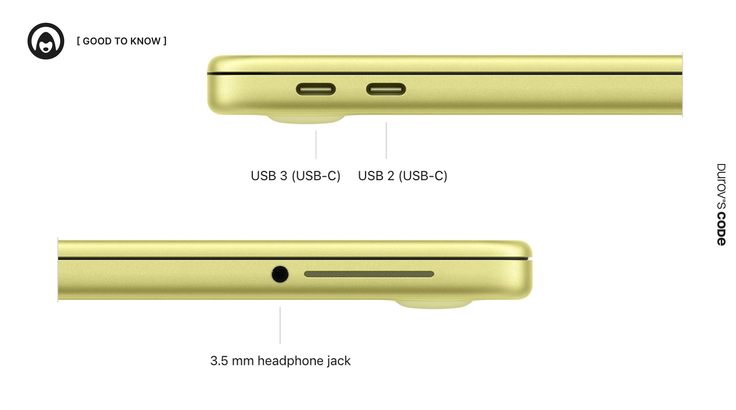
The laptop supports only one external display with a resolution of up to 4K at 60 Hz, and it must be connected through the USB 3 port.
MacBook Neo also does not include the magnetic MagSafe charging connector. Charging is done through one of the two USB-C ports, meaning only one port remains available while the device is plugged in.
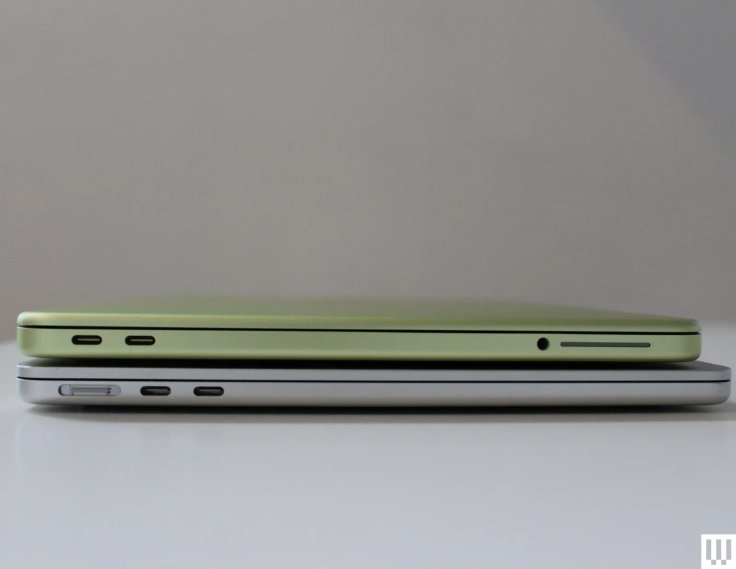
In practice, most users will likely rely on adapters, dongles, or USB hubs.
Display: a return to sRGB
The display is perhaps the most noticeable downgrade compared with the MacBook Air lineup. On paper, the specifications appear respectable. The laptop features a 13-inch IPS panel with a resolution of 2408×1506 and peak brightness of 500 nits, which matches the brightness level of the Air M3 and M4.

However, the key compromise lies in the lack of the wider DCI-P3 color gamut, replaced by the standard sRGB color space. For casual users who mainly write documents or browse the web, this difference may go unnoticed.
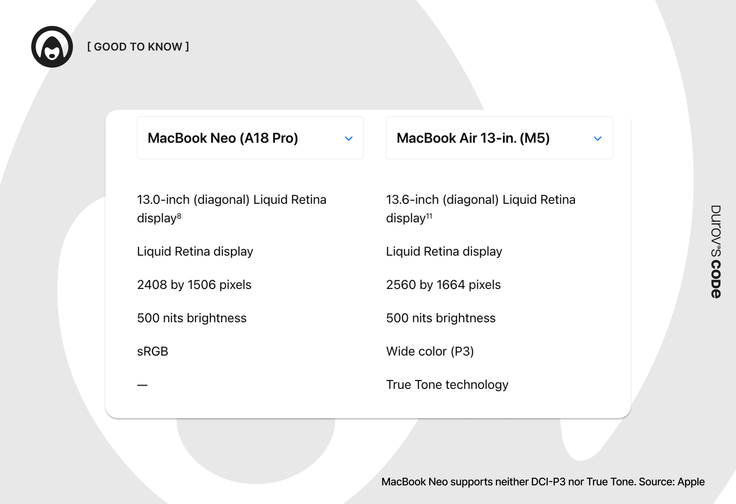
But when compared directly with a MacBook Air, colors on the Neo appear less vibrant and slightly flatter. Notebookcheck notes that the panel covers nearly the entire sRGB space and is suitable for basic graphic work, but it is not ideal for professional color-critical tasks.
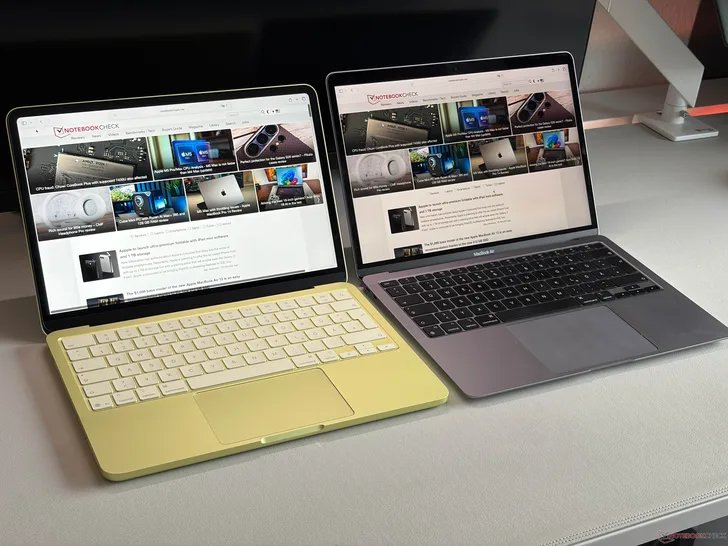
Another unusual omission for 2026 is the absence of True Tone, a feature that adjusts white balance according to ambient lighting and has been standard on Macs for nearly a decade. Without it, the screen may appear overly cool under warm indoor lighting, which can increase eye fatigue during long sessions. Viewing angles are also somewhat weaker than those on MacBook Air models, and contrast drops more noticeably when viewing the screen off-axis.

Overall, the display is sharp and bright, but lacks many of the features that make MacBook Air screens more comfortable to use in different environments.
Multimedia: camera, speakers, microphones
MacBook Neo comes with a 1080p FaceTime HD camera. Reviewers at The Verge describe the image quality as clear enough for everyday video calls. However, compared with the newer MacBook Air models with M4 or M5 chips, the difference becomes noticeable.

MacBook Neo does not include the advanced Center Stage feature, which in newer MacBook Air models relies on a 12-megapixel sensor and can automatically follow the user within the frame during video calls.
If you’re used to using a MacBook as a portable speaker, the Neo may disappoint. The laptop is equipped with only two speakers, while MacBook Air models with M3, M4, and M5 chips use a four-speaker system (or six speakers in the 15-inch versions) with support for wide stereo and spatial audio.
According to journalists at The Verge, the Neo’s speakers sound “full for their size,” but they lack depth and low-frequency bass. While a MacBook Air with the M4 chip can deliver deeper bass and a more immersive experience when watching movies, the Neo sounds noticeably flatter.
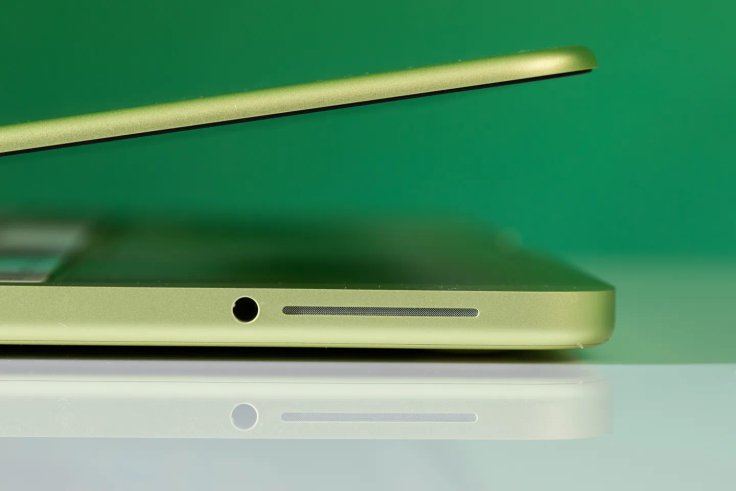
The situation with microphones is similar. The MacBook Neo features a two-microphone system. Apple no longer refers to them as “studio-quality microphones,” as it did in the marketing materials for the Air and Pro lineups.
This setup is perfectly sufficient for colleagues to hear you clearly on Google Meet, but it is no longer enough even for recording a simple podcast or voiceover. The absence of a third directional microphone, which in the Air is responsible for active noise reduction and echo suppression, makes voice recordings sound more “raw” and dependent on the room’s acoustics.
One important detail: although the Neo includes a 3.5 mm headphone jack, it does not support high-impedance headphones as effectively as modern Air and Pro models. For most users this is a minor detail, but for those who are used to working with audio using studio headphones, it may be another reason to consider more expensive models.
Keyboard and trackpad: aggressive cost cutting
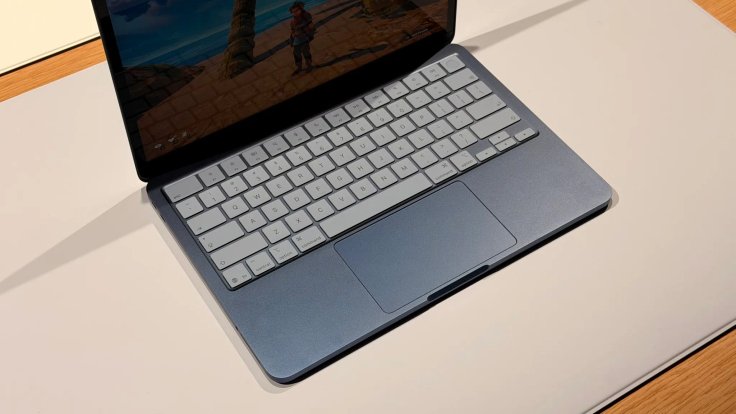
While the MacBook Air lineup has long established a certain “gold standard,” Apple clearly took a different approach with the Neo in order to reduce costs.
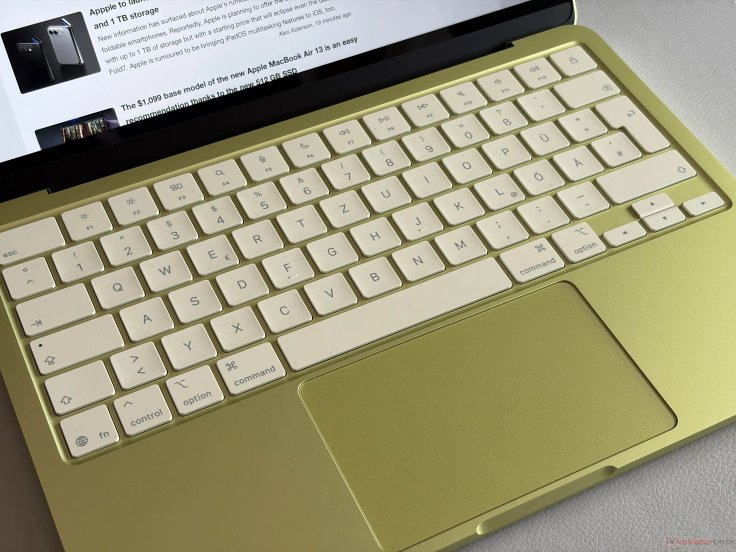
- No keyboard backlight. The keys match the color of the aluminum body, but there are no LEDs underneath them. Even the 512 GB version comes without any keyboard backlighting.

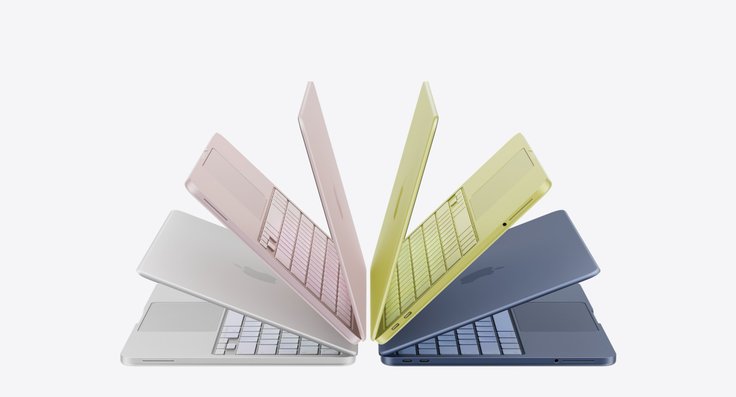
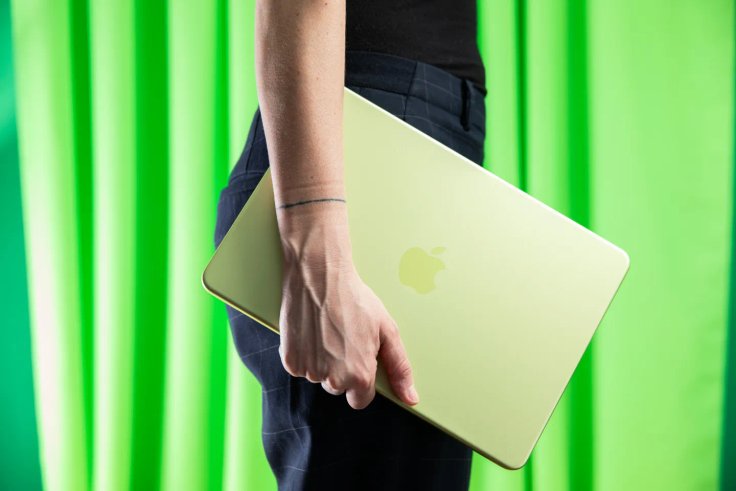
The laptop is available in four colors: Indigo, Blush, Citrus, and Silver.
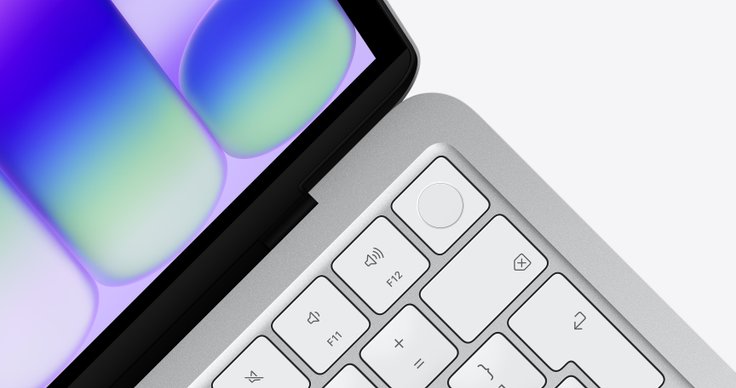
- Touch ID costs extra. In the base 256 GB model, the fingerprint scanner is replaced with a standard lock button.
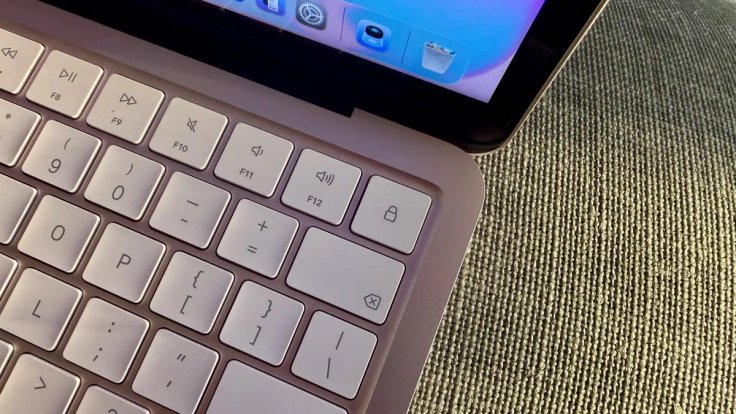
To get Touch ID, you need to step up to the 512 GB version, which costs $100 more.
- Mechanical trackpad. The Neo does not include Force Touch technology. The trackpad still clicks evenly across the surface, including near the top edge, but the tactile feel and sound are noticeably different from what you get on a MacBook Air.
Battery life and charging: not quite what you might expect
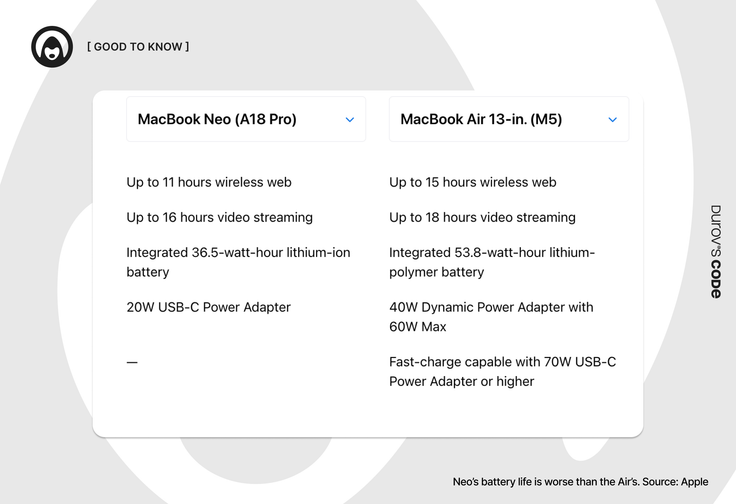
MacBook Neo includes a 36.5 Wh battery, which is relatively small by modern standards. For context, that is roughly the level of the 11-inch MacBook Air from more than a decade ago. By comparison, the MacBook Air models with M4 and M5 chips use 53.8 Wh batteries, nearly 50% larger.
Apple claims up to 16 hours of video playback and up to 11 hours of web browsing. For such a small battery, those numbers are respectable and should cover a full day of light work or studying.
Notebookcheck measured almost 13 hours of web browsing at 150 nits of brightness, but only 4 hours and 49 minutes at maximum brightness. The Verge recorded just under nine hours of mixed usage at roughly 75% brightness.
If you are used to the fast charging of modern MacBooks, the Neo may disappoint. In some regions it ships with the smallest and weakest charger Apple has ever included with a MacBook — a 20 W power adapter. It’s the same compact adapter Apple sells for iPhone and iPad. In some regions the charger is not included at all, though that is no longer unusual.
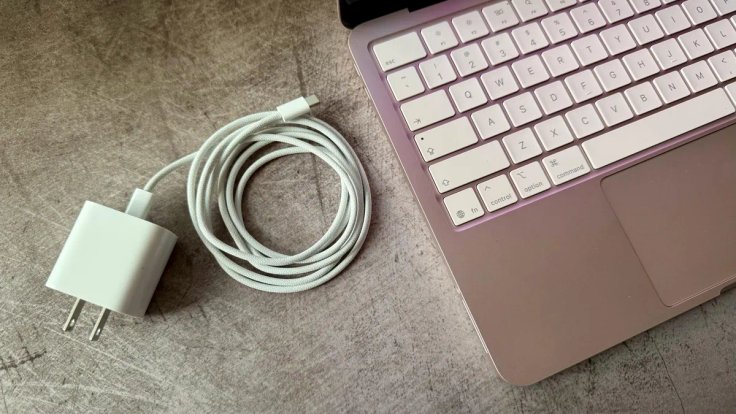
Independent testing shows the laptop can actually draw 24–30 W when connected to a more powerful charger, which speeds up charging somewhat. However, the device does not support true fast charging, such as reaching 50% battery in about 30 minutes.
For comparison, the latest MacBook Air with the M5 chip ships with a 40 W adapter (peaking at 60 W) and supports full fast charging.
Final verdict: who is MacBook Neo for?
MacBook Neo is not a failure, but it is a very specific device. Apple essentially created an ideal “digital typewriter” for users whose workflow rarely goes beyond browsing the web, writing documents, and watching videos.
Who should consider MacBook Neo
- Students who need an affordable Mac for lectures and essays.
- Office workers who mainly use cloud services and CRM systems.
- Families looking for a first computer for a child or a shared device for entertainment.
Who should probably look elsewhere
- Designers and photographers. The lack of P3 color support and True Tone makes color-critical work less comfortable.
- People who often work at night. The absence of keyboard backlighting can quickly become frustrating.
- Professionals with heavier workloads. USB 2.0 speeds, limited memory, and a slow charger can become constant bottlenecks.
Ultimately, the Neo is a budget Mac built around compromises. If you are willing to accept a mechanical trackpad and the absence of MagSafe in exchange for the lowest-priced Mac with an Apple logo on the lid, it may be the right choice.
For most other users, however, it likely makes more sense to spend a bit more on a MacBook Air or look for discounted models from previous generations.










Editor’s pick