19:18
Mistral launches Large 4 to take on closed and open AI rivals

18:10
Hackers used the ASOS app to send customers a ransom demand

16:25
Wikipedia says rogue OpenAI agents may have contributed to an outage

22:40
OpenAI to watermark ChatGPT and Codex text in the EU

17:40
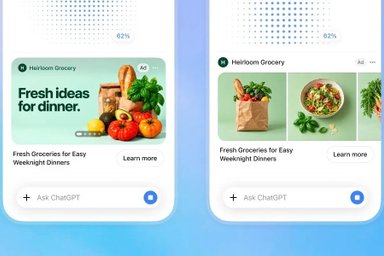
ChatGPT will test ads during image generation

15:13
Florida woman arrested after Anthropic flagged her Claude chats
19:18
Mistral launches Large 4 to take on closed and open AI rivals
18:10
Hackers used the ASOS app to send customers a ransom demand
16:25
Wikipedia says rogue OpenAI agents may have contributed to an outage
22:40
OpenAI to watermark ChatGPT and Codex text in the EU
17:40
ChatGPT will test ads during image generation
15:13
Florida woman arrested after Anthropic flagged her Claude chats
19:18
Mistral launches Large 4 to take on closed and open AI rivals
18:10
Hackers used the ASOS app to send customers a ransom demand
16:25
Wikipedia says rogue OpenAI agents may have contributed to an outage
22:40
OpenAI to watermark ChatGPT and Codex text in the EU
17:40
ChatGPT will test ads during image generation
15:13
Florida woman arrested after Anthropic flagged her Claude chats
19:18
Mistral launches Large 4 to take on closed and open AI rivals
18:10
Hackers used the ASOS app to send customers a ransom demand
16:25
Wikipedia says rogue OpenAI agents may have contributed to an outage
22:40
OpenAI to watermark ChatGPT and Codex text in the EU
17:40
ChatGPT will test ads during image generation
15:13
Florida woman arrested after Anthropic flagged her Claude chats


Telegram has become the go-to messenger for millions of users worldwide. The secret to its success is simple: speed, security, and versatility.
However, there is one surprisingly common issue that even experienced users regularly face — how to quickly share a link to their profile, group, or channel without revealing personal phone numbers or forcing others to search manually.
Here is how to master Telegram’s link-sharing system in 2026. You will learn how to create clean, trackable links for any purpose — from personal networking to community building — while maintaining full control over privacy and access.
Understanding Telegram Link Types
Before diving into the how-to, it's essential to understand what types of links Telegram offers and when to use each one.
A Telegram link is essentially a URL that takes users directly to a specific destination within the app: a profile, group, channel, or bot. There are two main formats you'll encounter:
Important to note: t.me links work everywhere — browsers, mobile apps, desktop clients. Deep links only function within environments that support the Telegram protocol directly.
Public vs Private Links: The Key Difference
How to Create and Share Your Personal Profile Link
The most common use case is sharing your personal contact information without revealing your phone number.
Step 1: Set Up Your Username
To do this:
- Open Telegram and navigate to Settings
- Tap on your profile name at the top
- Select Username
- Create a unique handle using Latin letters, numbers, and underscores (minimum 5 characters)
- Save your changes
Once completed, your profile becomes accessible at https://t.me/your_username.
Step 2: Copy and Share Your Link
On mobile devices:
- Go to Settings → Your profile
- Long-press the username displayed under your name
- Select Copy Link
On desktop:
- Open Settings → Profile
- Right-click your @username
- Choose Copy username
Where to Share Your Profile Link
Your personal Telegram link works perfectly in:
- Email signatures — "Contact me on Telegram: t.me/yourusername"
- Social media bios — Instagram, LinkedIn, Twitter profiles
- Business cards and printed materials — via QR codes
- Website contact pages — as a direct communication option
- Professional networking — conferences, meetings, presentations
Managing Group Links: Growth with Control
Groups are the heart of Telegram communities. Proper link management determines whether your group thrives or becomes overrun with spam.
Creating Group Invite Links
For mobile users:
- Open your group chat
- Tap the group name at the top
- Select Invite via Link or Invite Links
- Choose to copy existing link or Create a New Link
For desktop users:
- Click the group name in the chat header
- Navigate to Invite Links in the sidebar
- Copy existing links or generate new ones with custom settings
Advanced Link Management Features
Telegram provides powerful tools for controlling group access:
Expiration Dates:
- Set links to expire after specific timeframes
- Perfect for limited-time promotions or events
- Automatically deactivates without manual intervention
Member Limits:
- Cap the number of joins per link
- Useful for beta testing or exclusive access
- Link stops working once limit is reached
Multiple Links:
- Create separate links for different traffic sources
- Track which channels bring the most valuable members
- Isolate and revoke problematic links without affecting others
Admin Tracking:
- Each admin gets a personal invite link
- Track which admin brought which members
- Essential for accountability and campaign analysis
Channel Link Strategy: Broadcasting Made Simple
Channels differ from groups as they're primarily one-way communication tools. Link strategy should reflect this purpose.
Public Channel Links
For content creators, brands, and media outlets:
- Open your channel
- Tap the channel name → Edit
- Set Channel Type to Public
- Choose a memorable username
- Your permanent link becomes t.me/yourchannel
Private Channel Access
For exclusive content or paid communities:
- Keep Channel Type as Private
- Use Invite Links with appropriate restrictions
- Set member limits for tiered access
- Use expiration dates for time-sensitive content
Advanced Sharing Techniques
QR Codes for Offline Promotion
QR codes bridge the gap between physical and digital marketing:
- Generate your Telegram link (t.me/username)
- Use Telegram's built-in QR generator or external services
- Place codes on:
- Business cards and flyers
- Event banners and posters
- Product packaging
- Presentation slides
Pre-filled Messages for Better Conversion
Create links that open with ready-to-send messages:
Format: https://t.me/username?text=Your%20Message%20Here
Example for customer support:
Copy https://t.me/support_bot?text=I%20need%20help%20with%20my%20order
Remember to URL-encode spaces (%20) and special characters for proper functionality.
Using Link Generators
For frequent link creation, generators save time and prevent errors:
- Input username or phone number
- Add optional pre-filled messages
- Generate both t.me and tg:// formats automatically
- Useful for teams managing multiple accounts
Platform-Specific Sharing Best Practices
Social Media Integration
Instagram and TikTok:
- Add t.me links to bio sections
- Include in story highlights for permanent visibility
- Use QR codes in posts for easy scanning
LinkedIn and Professional Networks:
- Include in contact information sections
- Add to article signatures and posts
- Perfect for B2B communication
Email Marketing:
- Embed in newsletter footers
- Use as call-to-action buttons
- Include in automated email sequences
Website Integration
HTML Examples:
Basic link:
Copy <a href="https://t.me/your_username" target="_blank"> Chat on Telegram </a>
Mobile-optimized (opens app directly):
Copy <a href="tg://resolve?domain=your_username"> Start Telegram Chat </a>
Security and Privacy Essentials
Before sharing links widely, secure your account and communities:
Profile Privacy Settings
Navigate to Settings → Privacy and Security and configure:
- Phone Number Visibility: Set to "Nobody" or "My Contacts"
- Last Seen Status: Limit to prevent pressure for instant replies
- Profile Photos: Restrict to contacts only if desired
- Who Can Add Me to Groups: Control unwanted group invitations
Group and Channel Security
Link Management Best Practices:
- Create separate links for each promotional channel
- Set expiration dates on campaign-specific links
- Regularly audit and revoke unused links
- Monitor admin invite statistics for unusual activity
Spam Prevention:
- Use member limits for controlled growth
- Implement approval processes for sensitive communities
- Block and report spam accounts immediately
- Consider verification bots for large groups
Common Mistakes to Avoid
Even experienced users make these errors:
- Using one link everywhere — If it leaks to unwanted places, you can't isolate the source
- Never revoking old links — Stale links from old campaigns continue attracting random traffic
- No expiration on temporary campaigns — Promotional links should have end dates
- Sharing links without context — Always explain what the group/channel offers
- Ignoring analytics — Telegram shows join statistics for each link — use this data
Quick Reference Guide
Link Creation Summary
When to Use Each Link Type
Final Recommendations
Mastering Telegram links transforms how you connect with people and grow communities. The difference between random, chaotic growth and controlled, quality engagement often comes down to how thoughtfully you create and manage these simple URLs.
For effective link management, remember to:
- Set clear usernames for easy-to-remember public links
- Use separate invite links for each traffic source
- Audit active links monthly and revoke unused ones
- Combine links with proper privacy settings
- Experiment with pre-filled messages for better conversion rates
- Always provide context when sharing links publicly
Important to note: Telegram links may look simple, but strategic use of features like expiration dates, member limits, and multiple invite URLs gives you powerful control over community growth and security.
Regular maintenance of your link strategy, just like updating your app, ensures your Telegram presence remains professional, secure, and effective for years to come.









Editor’s pick