11:32
Claude can now turn artifacts into Mac and Windows apps

11:08
Telegram 13.3.2 beta adds automatic video captions on Android

12:05
Anthropic launches Claude Ship to review, fix and approve code

11:42
Musk turns to AI rivals for revenue as Grok struggles to compete

11:11
Nothing reveals Ear (note) earbuds that record calls and meetings

18:16
Jensen Huang returns as Nvidia CEO
11:32
Claude can now turn artifacts into Mac and Windows apps
11:08
Telegram 13.3.2 beta adds automatic video captions on Android
12:05
Anthropic launches Claude Ship to review, fix and approve code
11:42
Musk turns to AI rivals for revenue as Grok struggles to compete
11:11
Nothing reveals Ear (note) earbuds that record calls and meetings
18:16
Jensen Huang returns as Nvidia CEO

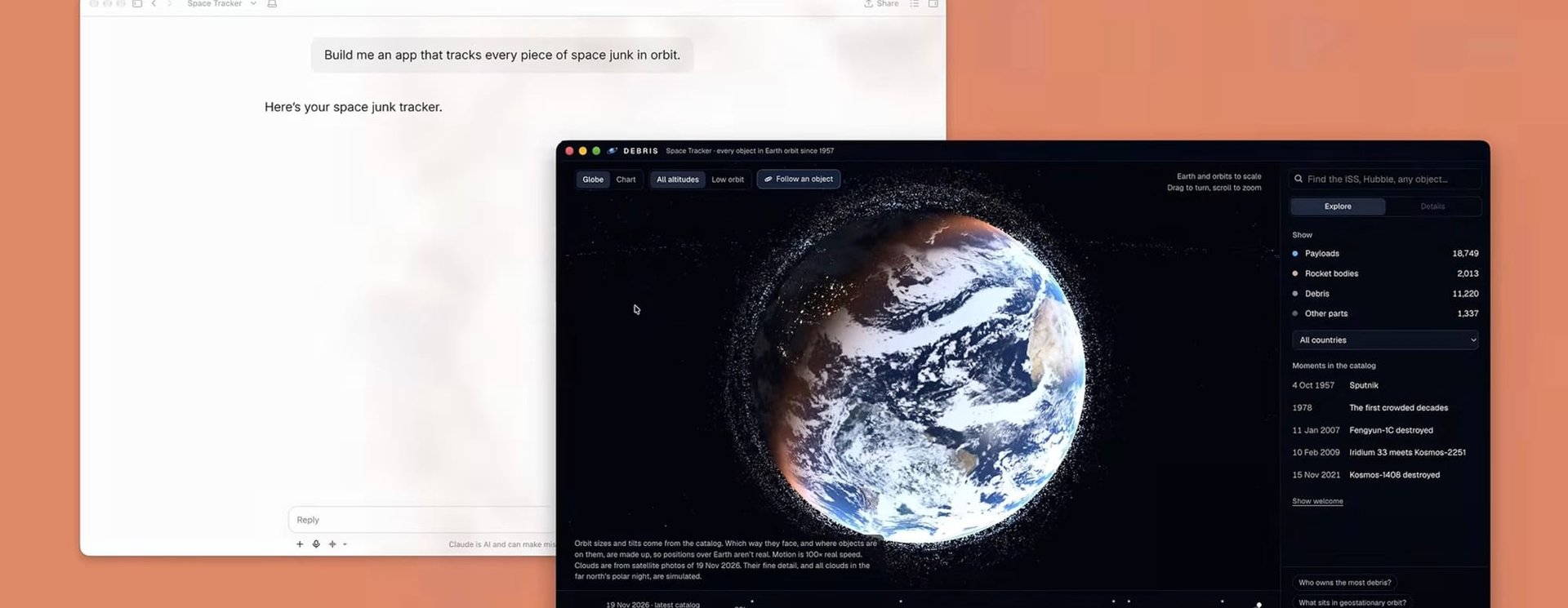
Anthropic has introduced “Install as app,” a beta feature that turns tools created in Claude into desktop apps for Mac and Windows.
An installed artifact gets its own icon and window, so users can open it without returning to the original conversation. It can use Claude and connected services, and it updates automatically when the underlying artifact changes.
Anthropic’s examples include a layered image editor, a file manager, a folder organizer and a system-performance monitor. Users can describe the tool they want, test it inside Claude, then select Install as app from the artifact’s Share menu. No packaging, code signing or API key is required.
Desktop access depends on permissions:
- Default access limits an app to what it could do in a browser.
- App permissions allow features such as notifications, global keyboard shortcuts and windows that stay above other apps.
- Full computer access lets an app run programs and read, modify or delete files without asking each time.
Full access is limited to apps users made themselves or, on Team and Enterprise plans, apps created within their organization. Anthropic does not review apps before installation.
Permissions cover one version of an app, and Claude asks again after updates, including the user’s own edits. Code loaded from external websites can change without triggering another request.
The apps still depend on Claude. Users must be online and signed in to open them, and requests they send to the AI count toward their plan’s usage limits.
The feature is rolling out across all plans, including Free, and requires Claude Desktop version 6.28899.0 or later. It is enabled by default on Team, with full computer access switched off. Enterprise owners must enable the feature.





Editor’s pick