17:40
Google launches Playground to turn text prompts into playable games

13:09
OpenAI releases 722 AI math papers amid criticism from mathematicians

12:32
EU looks to collect more tax from Apple, Meta and Google

10:55
What’s new in Nano Banana 2.1 and how much it costs

19:18
Mistral launches Large 4 to take on closed and open AI rivals

18:10
Hackers used the ASOS app to send customers a ransom demand
17:40
Google launches Playground to turn text prompts into playable games
13:09
OpenAI releases 722 AI math papers amid criticism from mathematicians
12:32
EU looks to collect more tax from Apple, Meta and Google
10:55
What’s new in Nano Banana 2.1 and how much it costs
19:18
Mistral launches Large 4 to take on closed and open AI rivals
18:10
Hackers used the ASOS app to send customers a ransom demand
17:40
Google launches Playground to turn text prompts into playable games
13:09
OpenAI releases 722 AI math papers amid criticism from mathematicians
12:32
EU looks to collect more tax from Apple, Meta and Google
10:55
What’s new in Nano Banana 2.1 and how much it costs
19:18
Mistral launches Large 4 to take on closed and open AI rivals
18:10
Hackers used the ASOS app to send customers a ransom demand
17:40
Google launches Playground to turn text prompts into playable games
13:09
OpenAI releases 722 AI math papers amid criticism from mathematicians
12:32
EU looks to collect more tax from Apple, Meta and Google
10:55
What’s new in Nano Banana 2.1 and how much it costs
19:18
Mistral launches Large 4 to take on closed and open AI rivals
18:10
Hackers used the ASOS app to send customers a ransom demand


Telegram is more than just a messaging app. It is a platform for communication, file sharing, creating channels and groups, and automating tasks with bots.
Launched in 2013 by brothers Pavel and Nikolai Durov, Telegram has become one of the most popular apps in the world thanks to its speed, security, and wide range of features. In 2026, the platform continues to evolve, adding new tools and capabilities.
In this guide, we explain what Telegram is, how to register on Telegram correctly in 2026, covering all available methods, solving common problems before they occur, and configuring essential security settings that protect your account from day one.
What is Telegram?
Telegram is a cloud-based messenger that allows users to send text messages, make voice and video calls, share files of any size and format, and create groups and channels for large audiences.
Its main advantages include:
- Speed. Messages are delivered instantly thanks to a distributed network of data centers.
- Security. Encryption is used throughout the platform, including end-to-end encryption for secret chats.
- Versatility. Supports groups with up to 200,000 members, channels with unlimited subscribers, bots, and mini apps.
- Cross-platform availability. Works on Android, iOS, Windows, macOS, Linux, and in a web browser.
- Free access. Telegram is free to use, with an optional Premium subscription offering additional features.
History and popularity
Telegram was launched in 2013 by the Durov brothers, who previously created the social network VKontakte. The messenger quickly gained popularity due to its focus on privacy and the absence of ads in the interface. As of March 2025, Telegram has more than 1 billion monthly active users worldwide.
Understanding Telegram Registration Requirements
Before diving into the registration process, it's important to set realistic expectations about what Telegram actually requires.
What You Absolutely Need
For this, you need to prepare:
- A phone number that can receive SMS or voice calls (personal or virtual)
- Internet connection on your registration device
- Compatible device: Android 6.0+, iOS 13.0+, or desktop computer
Important to note: Telegram does not support registration with email addresses only. Despite some misleading tutorials online, a phone number verification is mandatory for all new accounts in 2026.
Platform Registration Capabilities
For this, you need to understand: Desktop and web versions support logging into existing accounts via both QR code and phone number, but creating a completely new account from scratch requires the official mobile app.
Standard Registration Process
We explain how to complete standard registration when you have an active phone number.
Step 1: Download the Official Telegram App
For Android devices:
- Open Google Play Store, RuStore, or App Gallery
- Search for "Telegram" in the store
- Verify the developer is Telegram FZ-LLC
- Tap "Install" and wait for completion
- Launch the app after installation
For iOS devices:
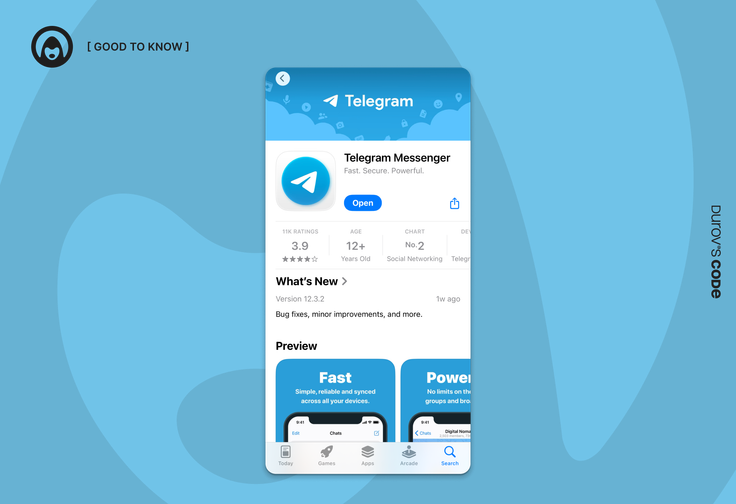
- Open the App Store on your device
- Search for "Telegram Messenger"
- Confirm the developer is Telegram FZ-LLC
- Tap "Get" and authenticate with Face ID/Touch ID
- Open the app once download completes
Important to note: Always use official app stores and verify the developer name. Unofficial versions may lack security updates or contain malicious modifications.
Step 2: Begin Registration
- Open Telegram and tap "Start Messaging"
- Select your country from the dropdown list
- Enter your phone number in international format (e.g., +1 555 123 4567)
- Double-check the number for accuracy
- Tap "Next" to proceed
Step 3: Verify Your Phone Number
Telegram will attempt verification in this order:
- Code to existing Telegram session (if account already exists)
- SMS with 5-6 digit code (most common for new registrations)
- Automated voice call (if SMS fails)
For this, you need to:
- Wait 10-30 seconds for the SMS code
- Enter the verification code when it arrives
- If no SMS comes, tap "Didn't get the code?"
- Select "Call me" for voice verification
- Listen to the automated call and enter the spoken code
Step 4: Complete Your Profile
After successful verification:
- First name (required): Enter your preferred display name
- Last name (optional): Add if desired
- Profile photo (optional): Tap camera icon to upload
- Tap the checkmark to finish registration
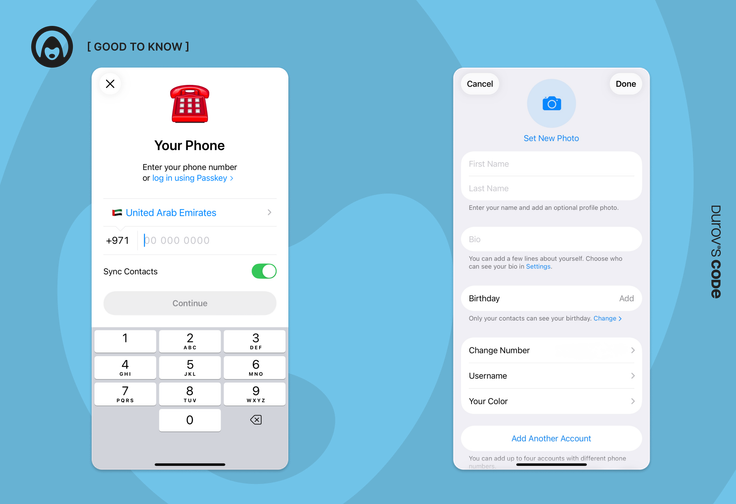
Privacy tip: Your display name doesn't need to match official documents. Many users choose pseudonyms for additional privacy.
Alternative Registration Methods for Privacy
Many users prefer not to link their personal phone number to messaging apps. While Telegram always requires phone verification, you don't have to use your primary SIM card.
Using Virtual Phone Numbers
Virtual numbers provide SMS/call capabilities without physical SIM cards, perfect for privacy-conscious users.
Popular virtual number services:
- Google Voice (US only, free)
- Twilio (international, paid)
- TextFree (free with ads)
- Hushed (privacy-focused, paid)
For this, you need to follow these steps:
- Choose a virtual number provider from the list above
- Sign up for the service and complete account verification
- Select a phone number from available options
- Use the virtual number during Telegram registration
- Receive verification code through the provider's app or website
- Complete registration as normal
Important to note: Some virtual numbers may already be associated with existing Telegram accounts. If you see an unfamiliar name/photo during login, the number was previously used by someone else.
Fragment Blockchain Numbers (+888)
For maximum anonymity, Telegram offers blockchain-based anonymous numbers through the Fragment platform.
Benefits of Fragment numbers:
- Complete anonymity with no personal data required
- Numbers start with +888 prefix
- Purchased using cryptocurrency (TON)
- Cannot be reassigned to other users
- No traditional telecom provider involved
For this, you need to:
- Visit the Fragment marketplace
- Connect a cryptocurrency wallet
- Purchase an anonymous +888 number
- Use this number for Telegram registration
- Maintain permanent control over the number
Common Registration Problems and Solutions
Practice shows that most problems occur during the number verification stage. We explain typical scenarios and their solutions.
Problem 1: "This Number Is Already Registered"
This message appears when your phone number was previously used for a Telegram account.
Solution options:
If you have access to another logged-in device:
- Open Telegram on that device
- Go to Settings → Edit Profile → Phone Number
- Change to your current number
- Complete verification on new device
If you have no access to existing sessions:
- The previous account holder must delete their account, or
- Wait for automatic deletion (18 months of inactivity by default), or
- Use a different phone number for registration
Important to note: The automatic deletion period can be customized in account settings, but the default timeout is 18 months of complete inactivity.
Problem 2: Verification Code Not Arriving
For this, you need to try these solutions systematically:
- Check network signal and ensure mobile coverage
- Wait longer - some carriers delay SMS delivery
- Request voice call via "Didn't get the code?" option
- Verify number format including correct country code
- Check spam/blocked messages in your SMS app
- Try different network (switch between WiFi/mobile data)
- Restart device to resolve temporary network issues
Problem 3: "Enter Code from Another Device"
This happens when Telegram detects an existing account and tries to send codes to active sessions instead of SMS.
For this, you need to:
- Check all your devices (phones, tablets, computers) for Telegram
- Look for a message from "Telegram" service account with the code
- If you don't have access to other devices, look for "Send SMS" button
- Use the mobile app instead of web/desktop versions
Problem 4: "Too Many Attempts" Error
Telegram limits registration attempts to prevent abuse.
Solution:
- Wait 24 hours before trying again
- Ensure you're entering the correct phone number
- Try from a different device if available
- Contact your mobile carrier if the number is blocked
Essential Security Configuration After Registration
Registration creates your account, but proper security configuration protects it. These settings should be configured immediately, not "when you have time."
Enable Two-Factor Authentication (2FA)
Two-factor authentication adds a permanent password to your account, protecting it even if someone gains access to your phone number.
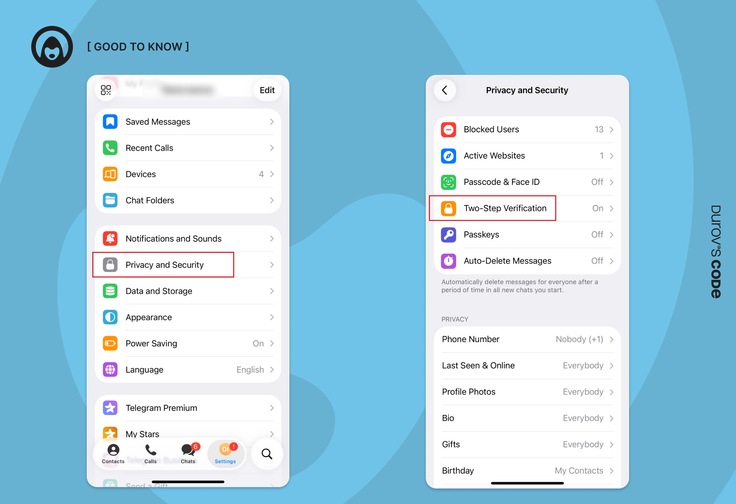
For this, you need to:
- Open Settings → Privacy and Security
- Tap Two-Step Verification
- Select Set Additional Password
- Create a strong, unique password (8+ characters, mixed case, numbers, symbols)
- Confirm the password by entering it again
- Add a recovery email address (strongly recommended)
- Verify your email by entering the confirmation code
Important to note: If you have an active session on any device and forget your 2FA password, you can reset it after a 7-day waiting period without losing data. However, if you have no active sessions and no recovery email, resetting 2FA will delete all cloud messages and contacts, though you can still use your phone number to create a fresh account.
Configure Privacy Settings
By default, Telegram shows your phone number to anyone in your contacts. This creates unnecessary privacy risks.
Phone number privacy:
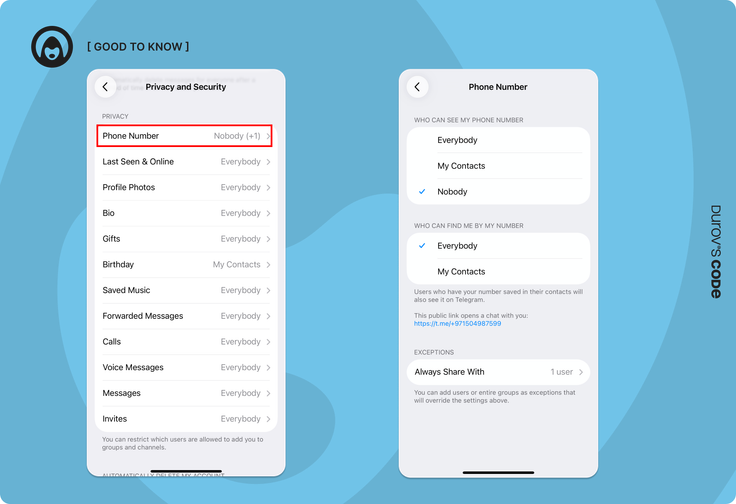
- Go to Settings → Privacy and Security → Phone Number
- Set "Who can see my phone number" to:
- Nobody (maximum privacy)
- My Contacts (balanced option)
- Configure "Who can find me by my number" separately
- Save changes
Last seen and online status:
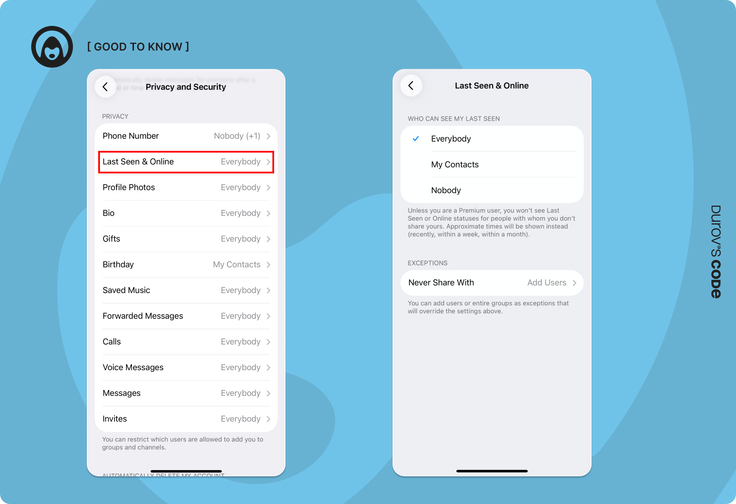
- Navigate to Settings → Privacy and Security → Last Seen & Online
- Choose visibility level:
- My Contacts (recommended)
- Nobody (maximum privacy)
- Everyone (not recommended)
- Add exceptions for specific users if needed
Create a Username for Contact Without Numbers
Usernames allow others to find you without revealing your phone number.
For this, you need to:
- Go to Settings and tap your name
- Select Username
- Enter a unique handle (minimum 5 characters, letters/numbers/underscores only)
- Check availability (Telegram shows if taken)
- Save your new username
Benefits:
- Share @username instead of phone number
- Others can search for you without your number
- Works for group invitations and channel links
- Can be changed anytime without affecting your account
Multiple Account Management
Telegram supports multiple accounts on a single device, useful for separating personal, work, and anonymous communications.
Account Limits in 2026
Adding Additional Accounts
For this, you need to:
- Open Telegram and tap the menu icon
- Tap your profile name at the top
- Select "Add Account"
- Complete registration with a different phone number
- Switch between accounts by tapping profile pictures
Important to note: Each account requires a unique phone number. Virtual numbers work perfectly for additional accounts.
Post-Registration Security Checklist
After registration, it's important not to stop at what you've achieved. Account security requires constant attention.
Immediate Actions (First 24 Hours)
For this, you need to complete:
- Enable Two-Factor Authentication with recovery email
- Configure phone number privacy (set to "Nobody" or "My Contacts")
- Create a username for number-free contact
- Set up last seen and online privacy
- Review and adjust profile photo visibility
- Check active sessions for unauthorized devices
Weekly Maintenance Tasks
- Review active sessions in Settings → Devices
- Check for app updates in your device's app store
- Verify no unknown logins or suspicious activity
Monthly Security Review
- Update 2FA password if compromised elsewhere
- Review privacy settings as Telegram adds new features
- Clean up unused bot connections and permissions
- Audit chat folder organization and permissions
Account Recovery Scenarios
Understanding recovery options before you need them can save your account and data.
Scenario 1: Lost Phone, Same Number
If you can get a new SIM with the same number:
- Insert new SIM and receive SMS codes normally
- Log in to Telegram using standard verification
- All your data will be available immediately
Scenario 2: Lost Phone and Number
If you have an active session on another device:
- Open Telegram on computer/tablet
- Go to Settings → Edit Profile → Phone Number
- Change to your new number immediately
- Complete verification with new number
If you have no active sessions:
- Contact your mobile carrier to reissue the same number
- Without the original number or active session, account recovery is impossible
- Telegram support cannot bypass phone verification for security reasons
Scenario 3: Compromised Account
If someone else gains access:
- Immediately go to Settings → Devices
- Tap "Terminate All Other Sessions"
- Change your 2FA password if enabled
- Review and update all privacy settings
- Check for unauthorized changes to profile or settings
Conclusion: Registration Done Right
Successful Telegram registration in 2026 extends far beyond entering a phone number and verification code. The decisions you make during and immediately after registration determine your privacy level, account security, and long-term platform experience.
Key takeaways for effective registration:
For privacy-focused users: Virtual phone numbers and Fragment anonymous numbers provide excellent alternatives to personal SIM cards. Combine these with proper username configuration and strict privacy settings to minimize personal data exposure while maintaining full platform functionality.
For security-conscious users: Two-factor authentication isn't optional—it's essential protection against SIM swapping and unauthorized access. Configure it immediately after registration, along with comprehensive privacy settings that match your threat model and usage patterns.
For business and multiple account users: Plan your registration strategy around the 3-4 account limits per device. Each account requires a unique phone number, so prepare virtual numbers in advance if you need multiple professional or anonymous accounts.
Important to note: Registration security requires ongoing maintenance, not one-time setup. Regularly review active sessions, update privacy settings as new features are added, and maintain access to your recovery methods.
The registration process establishes the foundation for your entire Telegram experience. Invest time in doing it correctly now—proper initial configuration prevents security headaches, privacy breaches, and account recovery nightmares later.
For this, you need to remember: Your Telegram account is only as secure as your weakest configuration choice. Regularly update the app, monitor your security settings, and always maintain control over at least one recovery method to ensure long-term account access.










Editor’s pick